Yocto project concepts walkthrough
Recipes
- Recipe Files (.bb): Contain information about a single piece of software.
- Recipe Contents:
- Location to download the unaltered source.
- Any source patches to be applied (if needed).
- Special configuration options to apply.
- Instructions on how to compile the source files.
- How to package the compiled output.
- Terminology:
- The term “recipe” is preferred over “package” to avoid confusion.
- “Package” refers to the packaged output from the OpenEmbedded build system (e.g., .ipk or .deb files).
Classes
- Class files (.bbclass) contain information that is useful to share between recipes files.
Configurations
- Configuration Files (.conf): Define configuration variables for the OpenEmbedded build process.
- Types of Configuration Files:
- Machine Configuration Options: Define machine-specific settings.
- Distribution Configuration Options: Specify settings for different distributions.
- Compiler Tuning Options: Optimize compiler settings.
- General Common Configuration Options: Apply common settings across the project.
- User Configuration Options: Found in
conf/local.confwithin the Build Directory, allowing user-specific customizations.
Layers
- Layers: Repositories containing related metadata (i.e., sets of instructions) for building a target in the OpenEmbedded build system.
- Purpose of Layers:
- Logically separate project information.
- Example: Use a layer to hold configurations for specific hardware, isolating hardware-specific settings.
- Allows sharing common metadata across different hardware using a separate layer.
- Yocto Project Layers:
- Follow a specific form by convention.
- Conforming to this structure allows BitBake to make assumptions about where to find metadata types during builds.
OpenEmbedded Build System Concepts
-
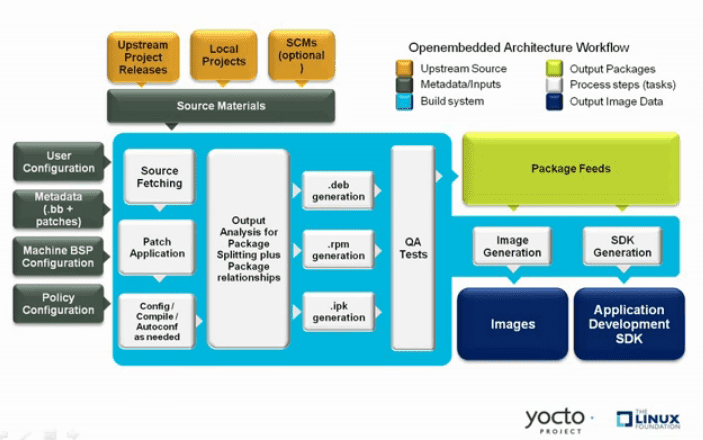
User Configuration: Metadata used to control the build process.
-
Metadata Layers: Layers providing software, machine, and distribution metadata.
-
Source Files: Includes upstream releases, local projects, and version control repositories.
-
Build System: Controlled by BitBake, handles fetching source, applying patches, compiling, packaging, testing, generating images, and cross-development tools.
-
Package Feeds: Directories containing output packages (RPM, DEB, or IPK) used to build images or SDKs. Can be shared for runtime package management.
-
Images: Output images created by the build process.
-
Application Development SDK: Cross-development tools produced alongside or separately using BitBake.
-
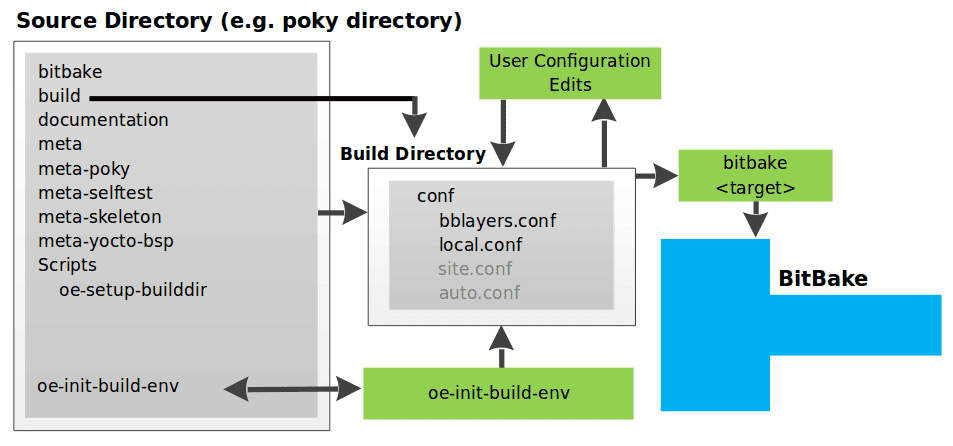
local.conf File:
- Defines many basic variables for the build environment:
- MACHINE: Target Machine Selection.
- DL_DIR: Download Directory.
- SSTATE_DIR: Shared State Directory.
- TMPDIR: Build Output.
- DISTRO: Distribution Policy.
- PACKAGE_CLASSES: Packaging Format.
- SDKMACHINE: SDK Target Architecture.
- EXTRA_IMAGE_FEATURES: Extra Image Packages.
- Note: Settings in
conf/local.confcan also be set inconf/site.confandconf/auto.conf.
- Defines many basic variables for the build environment:
-
bblayers.conf File:
- Specifies which layers BitBake should consider during the build.
- Default includes layers needed by the build system; custom layers must be added manually.
-
Configuration File Parsing Order:
- OpenEmbedded Build System reads configuration files in this order:
site.conf,auto.conf,local.conf. - Normal assignment rules apply: later files can override variables set in earlier files.
- OpenEmbedded Build System reads configuration files in this order:
-
Launching the Build:
- Use the
bitbake targetcommand. - BitBake sorts out configurations to define the build environment.
- Use the
Metadata, Machine Configuration, and Policy Configuration
-
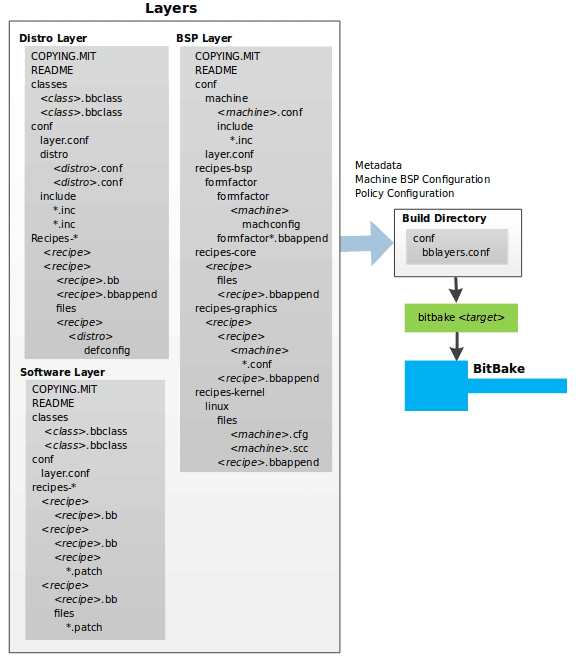
Types of Layer Input:
- Metadata (.bb + Patches):
- Software layers containing user-supplied recipe files, patches, and append files.
- Example:
meta-qt5layer from the OpenEmbedded Layer Index for Qt 5.0 framework.
- Machine BSP Configuration:
- Board Support Package (BSP) layers providing machine-specific configurations.
- Example:
meta-yocto-bsplayer from the Poky Reference Distribution.
- Policy Configuration:
- Distribution layers providing top-level policies for images or SDKs built for a specific distribution.
- Example:
meta-pokylayer in the Poky Reference Distribution, with configuration files inconf/distro(e.g.,poky.conf).
- Metadata (.bb + Patches):
-
Common Layer Structure:
- Licensing File: e.g.,
COPYING.MIT, required for distributed layers. - README File: Good practice, especially for distributed layers.
- Configuration Directory: Contains necessary configuration files.
- Recipe Directories: Holds recipe files and patches.
- Licensing File: e.g.,
-
BitBake Configuration:
- Uses
conf/bblayers.conf(part of user configuration) to determine which layers to use in the build.
- Uses
Distro layer
-
Distro Layer:
- Provides policy configurations for your distribution.
- Best Practices: Isolate these configurations into their own layer.
- Override Mechanism: Settings in
conf/distro/distro.confoverride similar settings inconf/local.confin the Build Directory.
-
Typical Contents of a Distribution Layer:
- classes:
- Contains class files (
.bbclass) that hold common functionality shared among recipes. - Recipes that inherit a class take on its settings and functions.
- Contains class files (
- conf:
- Contains configuration files for the layer (
conf/layer.conf), the distribution (conf/distro/distro.conf), and any distribution-wide include files.
- Contains configuration files for the layer (
- recipes-*:
- Contains recipes and append files that affect common functionality across the distribution.
- May include distribution-specific configuration, initialization scripts, custom image recipes, etc.
- Examples:
recipes-core,recipes-extra. - Contents generally include:
- Recipe files (
*.bb). - Recipe append files (
*.bbappend). - Distro-specific directories for configuration files.
- Recipe files (
- classes:
BSP Layer
-
Provides machine configurations for specific hardware.
-
Purpose: Everything is tailored to the machine for which you are building the image or SDK.
-
Common Structure of BSP Layers:
- Configuration Directory:
- Machine Configuration Files:
conf/machine/machine.conf. - Layer Configuration Files:
conf/layer.conf.
- Machine Configuration Files:
- Recipe Directories:
- recipes-bsp: Specific to board support packages.
- recipes-core: Core functionalities.
- recipes-graphics: Graphics support systems.
- recipes-kernel: Kernel-specific recipes.
- May include metadata for multiple form factors, graphics support systems, etc.
- Configuration Directory:
Software Layer
- The software layer provides the Metadata for additional software packages used during the build. This layer does not include Metadata that is specific to the distribution or the machine, which are found in their respective layers.
- This layer contains any recipes, append files, and patches, that your project needs.
Sources
Upstream Project Releases
- Description:
- Archive files (e.g., tarball or zip file) from upstream projects.
- Correspond to individual recipes.
- Examples: Releases for BusyBox, Qt, and Dbus.
Local Projects
- Description:
- Custom software provided by the user.
- Resides locally within the project directory.
- Integration:
- Use
externalsrcclass to include the local project. - Override or set the recipe in
local.confor a recipe’s append file to point to the local directory.
- Use
Source Control Managers (Optional)
- Description:
- Fetch source files using SCMs like Git or Subversion.
- Clones or checks out a repository.
- Integration:
do_fetchtask in BitBake usesSRC_URIvariable and its prefix to determine the fetcher module.- Note:
- Use
BB_GENERATE_MIRROR_TARBALLSvariable to generate tarballs for Git repositories and place them in theDL_DIRdirectory.
- Use
SRCREVvariable determines the specific revision to build from.
Source Mirror(s)
-
Types of Mirrors:
- Pre-mirrors:
- Checked by BitBake before looking upstream.
- Suitable for shared directories not defined by
DL_DIR. - Typically point to a local shared directory within your organization.
- Regular Mirrors:
- Alternative sites across the Internet.
- Used if the primary site is unavailable.
- Pre-mirrors:
-
Variables:
PREMIRRORS: Points to pre-mirrors.MIRRORS: Points to regular mirrors.
Package feeds
-
Purpose:
- Packages are sourced from a package feed area in the Build Directory.
- Package feeds serve as an intermediary step in the build process.
-
Package Generation:
- Classes: OpenEmbedded provides classes to generate different package types.
- Enabling Classes: Specify which classes to enable via the
PACKAGE_CLASSESvariable. - Quality Assurance: The
insaneclass performs validation checks on packages before they are placed in the package feeds.
Package Feed Area
- Location: Resides in the Build Directory.
- Directory Configuration:
- DEPLOY_DIR: Defined as
tmp/deployin the Build Directory. - DEPLOY_DIR_ Variables*:
- Sub-folders based on package manager (e.g.,
DEPLOY_DIR_RPM,DEPLOY_DIR_IPK,DEPLOY_DIR_DEB).
- Sub-folders based on package manager (e.g.,
- PACKAGE_ARCH: Defines architecture-specific sub-folders (e.g.,
i586,qemux86).
- DEPLOY_DIR: Defined as
Package Writing Tasks
- BitBake Tasks:
- Generates packages and places them into the package holding area.
- Tasks include:
do_package_write_ipk: For IPK packages.do_package_write_deb: For DEB packages.do_package_write_rpm: For RPM packages.
Example Scenario
- IPK Package Manager:
- Architectures: Support for both
i586andqemux86. - Directory Structure:
- Packages for
i586:build/tmp/deploy/ipk/i586. - Packages for
qemux86:build/tmp/deploy/ipk/qemux86.
- Packages for
- Architectures: Support for both
Bitbake
The OpenEmbedded build system uses BitBake to produce images and Software Development Kits (SDKs). The BitBake area consists of several functional areas.
- Source Fetching
- Patching
- Configuration, Compilation, and Staging
- Package Splitting
- Image Generation
- SDK Generation
- Stamp Files and the Rerunning of Tasks
- Setscene Tasks and Shared State
Source Fetching: Initial Stages of Building a Recipe
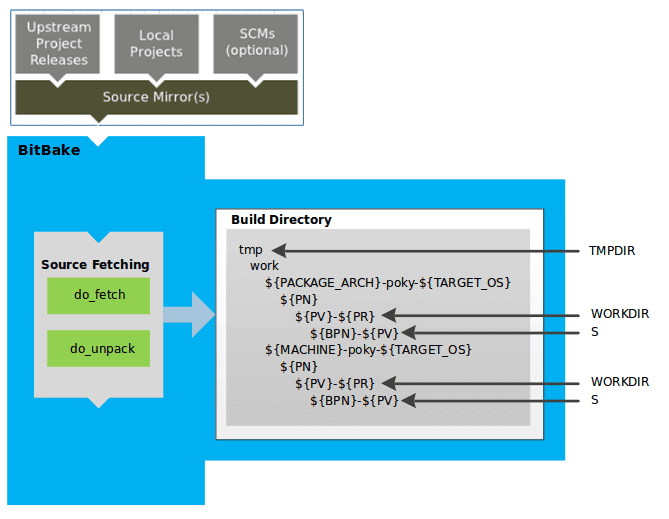
Fetching and Unpacking Source Code
-
Tasks:
- do_fetch: Fetches the source files.
- do_unpack: Unpacks the fetched source files into the Build Directory.
-
Checksum Verification:
- For every local file specified in a recipe’s
SRC_URI(e.g.,file://), the OpenEmbedded build system takes a checksum. - The checksum is included in the
do_fetchtask’s signature. - If any local file is modified, the
do_fetchtask and all dependent tasks are re-executed.
- For every local file specified in a recipe’s
Build Directory Structure
-
General Information:
- All operations are performed in the Build Directory, which follows a defined structure.
- Detailed information can be found in the “build/” section of the Yocto Project Reference Manual.
-
Recipe-Specific Area:
- Each recipe has a designated area in the Build Directory for unpacked source code.
- The
Svariable points to this area.
Build Directory Hierarchy
-
TMPDIR:
- Base directory for all build system operations.
- Default:
tmpdirectory.
-
PACKAGE_ARCH:
- Architecture of the built package(s).
- Varies based on the destination (e.g., machine architecture, Build Host, SDK).
-
TARGET_OS:
- Operating system of the target device (e.g., “linux”).
-
PN:
- Name of the recipe used to build the package.
-
WORKDIR:
- Location where the recipe is built.
-
PV:
- Version of the recipe.
-
PR:
- Revision of the recipe.
-
S:
- Directory containing the unpacked source files for a given recipe.
-
BPN:
- Name of the recipe, with common prefixes and suffixes removed.
Notes on Hierarchy
- Sample Hierarchies:
- Based on
PACKAGE_ARCHandMACHINE. - Identical underlying structures, differentiated by the build target (e.g., general architecture, build host, SDK, specific machine)
- Based on
Patching: Applying Patches to Source Code
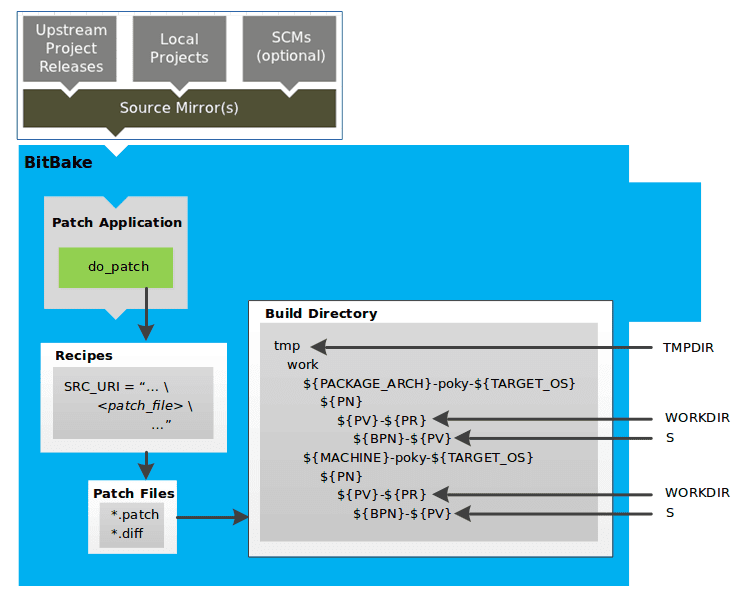
Patch Application Process
-
Task:
- do_patch: Applies patches to the unpacked source files.
-
Locating Patch Files:
- Uses a recipe’s
SRC_URIstatements and theFILESPATHvariable to find applicable patch files. - Default File Types: Assumes patch files are either
*.patchor*.diff. - Customization:
SRC_URIparameters can modify how patch files are recognized.
- Uses a recipe’s
-
Order of Application:
- BitBake applies multiple patches for a single recipe in the order they are found.
Variables and Directories
-
FILESPATH:
- Defines the default set of directories that the build system uses to search for patch files.
-
S Directory:
- Contains the recipe’s unpacked source files where patches are applied.
Configuration, Compilation, and Staging
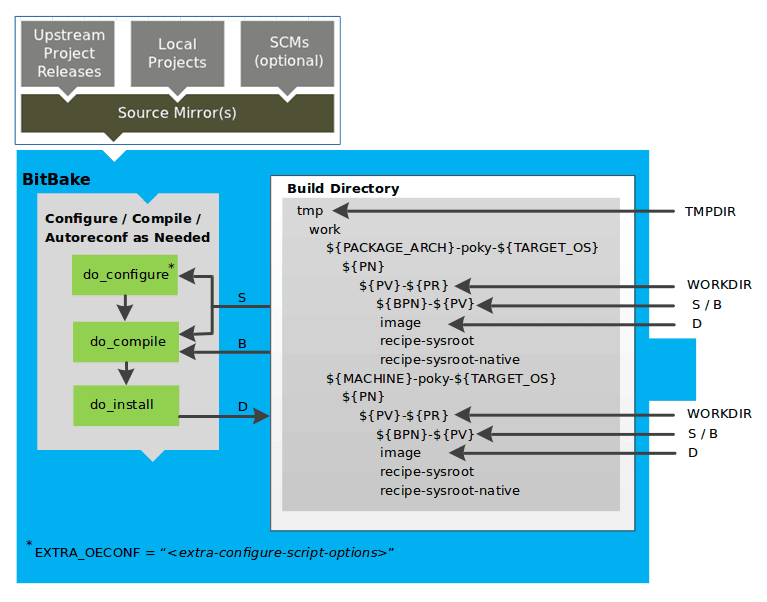
Key Tasks in the Build Process
-
do_prepare_recipe_sysroot
- Purpose: Sets up two sysroots in
${WORKDIR}:- recipe-sysroot: For target binaries.
- recipe-sysroot-native: For native binaries running on the host system.
- Function: Prepares sysroots to contain the contents of the
do_populate_sysroottasks of dependent recipes.
- Purpose: Sets up two sysroots in
-
do_configure
- Purpose: Configures the source code by enabling and disabling build-time and configuration options.
- Sources of Configuration:
- Recipe itself.
- Inherited classes.
- Software’s self-configuration based on the target.
- Customization:
- autotools Class: Add configuration options using
EXTRA_OECONForPACKAGECONFIG_CONFARGSvariables.
- autotools Class: Add configuration options using
-
do_compile
- Purpose: Compiles the source code.
- Directory:
- Uses the directory pointed to by the
Bvariable. - By default,
Bis the same asS(source directory).
- Uses the directory pointed to by the
-
do_install
- Purpose: Copies compiled files from the
Bdirectory to a staging area. - Staging Directory: Pointed to by the
Dvariable. - Function: Prepares files for the packaging phase.
- Purpose: Copies compiled files from the
Configuring, Compiling, and Staging Source Code
Key Tasks in the Build Process
-
do_prepare_recipe_sysroot
- Purpose: Sets up two sysroots in
${WORKDIR}:- recipe-sysroot: For target binaries.
- recipe-sysroot-native: For native binaries running on the host system.
- Function: Prepares sysroots to contain the contents of the
do_populate_sysroottasks of dependent recipes.
- Purpose: Sets up two sysroots in
-
do_configure
- Purpose: Configures the source code by enabling and disabling build-time and configuration options.
- Sources of Configuration:
- Recipe itself.
- Inherited classes.
- Software’s self-configuration based on the target.
- Customization:
- autotools Class: Add configuration options using
EXTRA_OECONForPACKAGECONFIG_CONFARGSvariables.
- autotools Class: Add configuration options using
-
do_compile
- Purpose: Compiles the source code.
- Directory:
- Uses the directory pointed to by the
Bvariable. - By default,
Bis the same asS(source directory).
- Uses the directory pointed to by the
-
do_install
- Purpose: Copies compiled files from the
Bdirectory to a staging area. - Staging Directory: Pointed to by the
Dvariable. - Function: Prepares files for the packaging phase.
- Purpose: Copies compiled files from the
Package Splitting
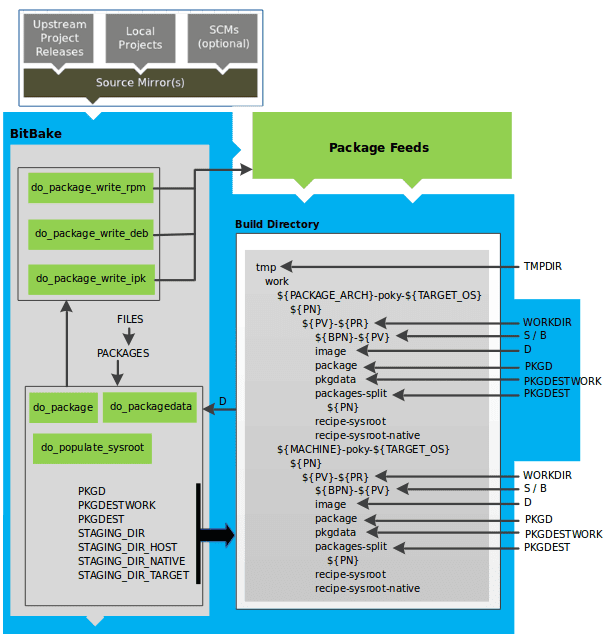
Analyzing and Packaging the Build Output
Key Tasks in Packaging Process
-
do_package
- Purpose: Analyzes the files in the
Ddirectory and splits them into subsets. - Analysis Includes:
- Splitting out debugging symbols.
- Checking shared library dependencies between packages.
- Assessing package relationships.
- Purpose: Analyzes the files in the
-
do_packagedata
- Purpose: Creates package metadata based on the analysis.
- Function: Helps the build system generate the final packages.
-
do_populate_sysroot
- Purpose: Stages (copies) a subset of files installed by the
do_installtask into the appropriate sysroot.
- Purpose: Stages (copies) a subset of files installed by the
Working Areas for Analysis and Packaging
- PKGD: Destination directory for packages before splitting into individual packages.
- PKGDESTWORK: Temporary work area used by
do_packageto save package metadata. - PKGDEST: Parent directory for packages after they have been split.
- PKGDATA_DIR: Shared, global-state directory holding packaging metadata generated during the packaging process.
- STAGING_DIR_HOST: Path for the sysroot for the system on which a component is built to run (i.e.,
recipe-sysroot). - STAGING_DIR_NATIVE: Path for the sysroot used when building components for the build host (i.e.,
recipe-sysroot-native). - STAGING_DIR_TARGET: Path for the sysroot used when a component generates code for another machine (e.g., cross-canadian recipes).
Defining Files and Packages
- FILES Variable: Defines the files that go into each package in
PACKAGES. - Package Types: RPM, DEB, IPK.
- do_package_write_ Tasks*: Create the actual packages based on the type and place them in the Package Feed area (
${TMPDIR}/deploy).
- do_package_write_ Tasks*: Create the actual packages based on the type and place them in the Package Feed area (
Package Feeds
- Package Feed Creation:
- Packages are placed in the
deploydirectory. - Note: Direct feed creation from
deploy/*directories is not supported out of the box. - Feed Maintenance: Requires a mechanism to upload new packages into an official package feed, which is distribution-specific.
- Packages are placed in the
Image Generation
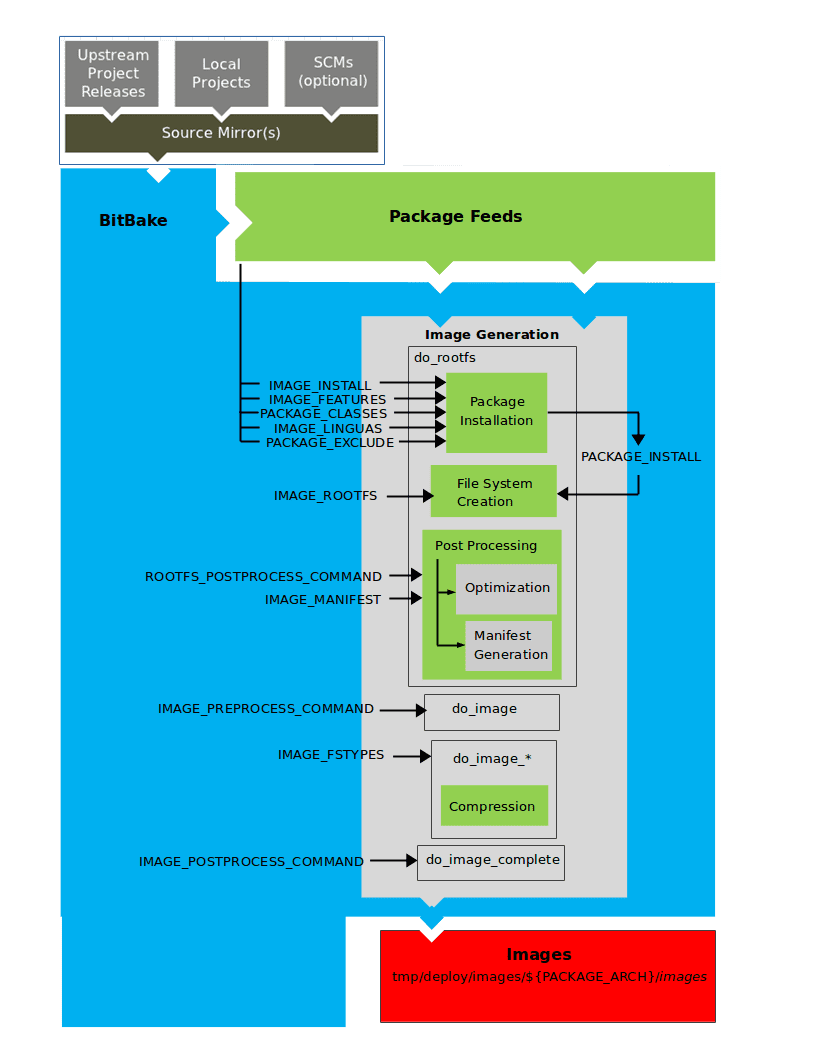
Key Stages and Tasks
-
do_rootfs
- Purpose: Creates the root filesystem (file and directory structure) for an image.
- Key Variables:
- IMAGE_INSTALL: List of base packages to install from the Package Feeds area.
- PACKAGE_EXCLUDE: Specifies packages to exclude from the image.
- IMAGE_FEATURES: Features to include in the image, mapping to additional packages.
- PACKAGE_CLASSES: Specifies the package backend (RPM, DEB, IPK) and locates packages in the Package Feeds area.
- IMAGE_LINGUAS: Languages for which additional support packages are installed.
- PACKAGE_INSTALL: Final list of packages for installation into the image.
- Filesystem Construction:
- IMAGE_ROOTFS: Points to the filesystem under construction.
- PACKAGE_INSTALL: Provides the list of packages to install.
-
Package Installation
- Controlled by: The package manager (dnf/rpm, opkg, apt/dpkg).
- Package Manager Data: Deleted from the root filesystem if package management is not enabled for the target.
- Post Installation Scripts: Run during package installation; any scripts failing on the build host are rerun on the target at first boot (especially important for read-only root filesystems).
-
Post Processing
- Manifest File:
- Location: Same directory as the root filesystem image.
- Content: Lists installed packages, useful for testimage class (IMAGE_MANIFEST variable).
- Optimizations:
- Processes: Include mklibs (optimizes library size) and other commands defined by the ROOTFS_POSTPROCESS_COMMAND variable.
- Manifest File:
-
do_image
- Purpose: Processes the root filesystem into the final image.
- Pre-processing: Runs commands defined by IMAGE_PREPROCESS_COMMAND.
- Dynamic Task Creation:
- Based on IMAGE_FSTYPES variable (specifies image types and formats).
- Examples:
do_image_ext4for ext4 image type.
-
do_image_complete
- Purpose: Completes image creation by applying post-processing commands.
- Post-processing: Defined by IMAGE_POSTPROCESS_COMMAND.
Important Considerations
- Pseudo:
- Ensures correct file ownership in the root filesystem.
- Entire image generation process runs under Pseudo.
SDK Generation
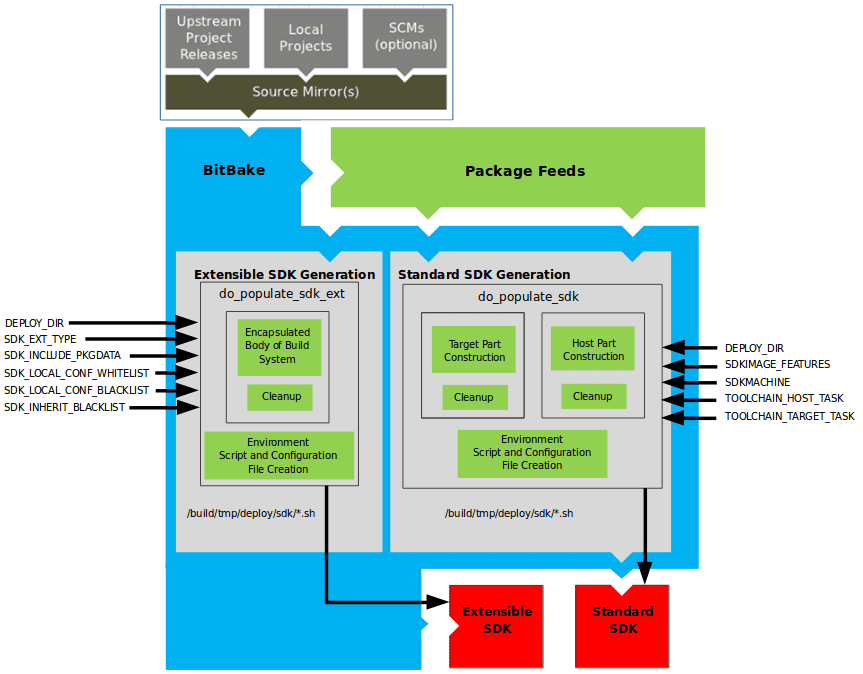
The OpenEmbedded build system uses BitBake to generate SDK installer scripts for both the standard SDK and the extensible SDK (eSDK). The process consists of several stages and relies on various key variables.
Key Tasks and Variables
-
do_populate_sdk
- Purpose: Creates the standard SDK.
- Components:
- Target Part: Built for the target hardware, includes libraries and headers.
- Host Part: Runs on the SDKMACHINE.
- Variables: Refer to the “Application Development SDK” section for detailed variable information.
-
do_populate_sdk_ext
- Purpose: Creates the extensible SDK (eSDK).
- Components:
- Encapsulation: Includes everything needed for the SDK (both host and target parts).
- Differences: Handles host and target parts differently than the standard SDK.
Process Steps
-
Creating the SDK
- Standard SDK:
do_populate_sdktask handles the separation into target and host parts. - Extensible SDK:
do_populate_sdk_exttask encapsulates the entire build system for a more comprehensive SDK.
- Standard SDK:
-
Post-Processing and Cleanup
- Both tasks perform cleanup operations after creating the necessary components.
-
Generating the Cross-Development Environment Setup Script
- Script Creation: A cross-development environment setup script is generated.
- Configuration Files: Any required configuration files are also created.
- Final Output: The result is a cross-development toolchain installation script (
.shfile), which includes the environment setup script.
Stamp Files and Task Rerunning in BitBake
-
Stamp Files:
- Purpose: Indicate the completion of a task.
- Location: Written into the
STAMPS_DIRdirectory. - Naming: Determined by the
STAMPvariable and includes the task’s name and current input checksum.
-
Signature Handling:
- Default Handler: Assumes
BB_SIGNATURE_HANDLERis set to “OEBasicHash”.
- Default Handler: Assumes
Determining Task Rerun
-
Check Mechanism:
- BitBake checks for a matching stamp file with the current input checksum.
- If the stamp file exists, the task’s output is assumed to be valid, and the task is not rerun.
- If the stamp file does not exist or has a different checksum, the task is rerun.
-
General Stamp Mechanism:
- More general than the shared state (sstate) cache mechanism.
- Avoids rerunning tasks with valid stamp files.
-
Stamp File Function:
- Marker: Indicates that work has been done.
- Not Output Record: Does not record the actual task output, which is usually found in
TMPDIR(e.g., in a recipe’sWORKDIR).
Shared State (sstate) Cache
- Purpose: Caches task output for sharing between build machines.
- Comparison with Stamp Files:
- Stamp files only indicate task completion, while sstate caches task output.
Directory Management
- TMPDIR:
- Removal: Removing
TMPDIRalso removesSTAMPS_DIR. - Effect: Tasks will be rerun to repopulate
TMPDIR.
- Removal: Removing
Special Handling
- nostamp Varflag:
- Purpose: Marks a task to always be considered “out of date”.
- Impact: Tasks depending on a nostamp-marked task will also be considered out of date.
Setscene Tasks and Shared State (sstate) in BitBake
- Purpose: Allows BitBake to skip tasks by using prebuilt objects available in a shared state (sstate) cache.
- Concept: A setscene task (
do_taskname_setscene) bypasses the standard build process by placing prebuilt files into specific locations.
Key Variables
- SSTATE_DIR: Directory where the sstate cache is stored.
- SSTATE_MIRRORS: Mirrors to look for sstate cache objects.
Setscene Tasks
- Function: Setscene tasks are versions of standard tasks that utilize prebuilt objects.
- Appropriate Tasks: Not all tasks have setscene variants, only those where using prebuilt objects is beneficial (e.g.,
do_package,do_package_write_*,do_deploy,do_packagedata,do_populate_sysroot).
Process
-
Identification of Setscene Tasks:
- Valid Tasks: Tasks that produce an end result suitable for reuse.
- Non-Valid Tasks: Tasks where redoing the work is essential (e.g.,
do_patch,do_unpack).
-
Task Relationship:
- The build system understands which tasks depend on others.
- For example, if
do_populate_sysroot_setsceneis used, preceding tasks likedo_fetch,do_unpack, etc., are not needed.
-
Skipping Unnecessary Tasks:
- When objects are available in the sstate cache, tasks such as the compiler or native tools are not required.
- If package files are available, tasks like
do_packagemay be skipped.
Two-Phase Build Process
-
Setscene Stage:
- Check sstate Cache: BitBake checks the cache for targets to build.
- Fast Check: Quickly verifies object existence without complete downloads.
- Proceed if Available: If objects are found, the setscene stage completes and the build process proceeds.
-
Main Build Stage:
- Work Backwards: The build system looks for necessary packages and tools starting from the end targets.
- Skip Unneeded Components: If components are available in the cache, they are not downloaded or built.
- Install Dependencies if Needed: If something is unavailable or fails, dependencies are installed from the cache.
Function Handling
- BB_HASHCHECK_FUNCTION: Determines the availability of objects in the sstate cache.
- BB_SETSCENE_DEPVALID: Checks whether a dependency needs to be followed for a given relationship, returning True or False.
Images
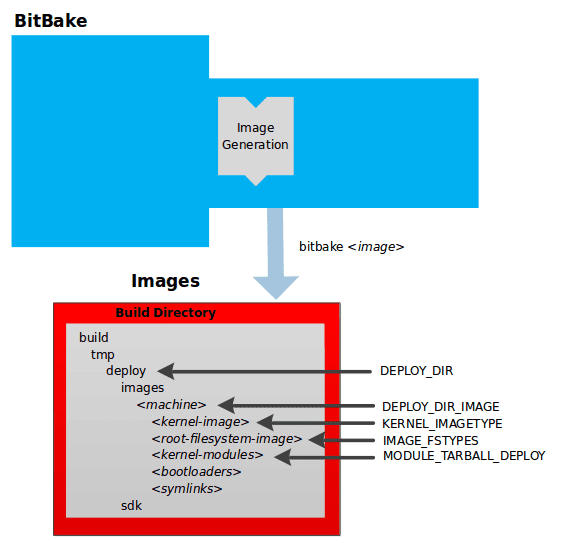
Build System Output Overview
The build system generates compressed root filesystem images ready to boot on a target device. This output is found in the tmp/deploy/images/machine/ directory within the Build Directory. The key components include kernel images, root filesystem images, kernel modules, bootloaders, and symlinks. The relevant directories and file types are determined by specific variables.
Key Directories and Variables
- DEPLOY_DIR: Points to the deploy directory.
- DEPLOY_DIR_IMAGE: Points to the directory containing images for the current configuration.
Components
-
Kernel Image
- Description: A binary file for the kernel.
- Naming: Determined by the
KERNEL_IMAGETYPEvariable. - Location:
deploy/images/machine/. - Details: Can include multiple image files for the machine.
-
Root Filesystem Image
- Description: Root filesystems for the target device (e.g.,
*.ext3or*.bz2files). - Type: Determined by the
IMAGE_FSTYPESvariable. - Location:
deploy/images/machine/. - Details: Can include multiple root filesystem files for the machine.
- Description: Root filesystems for the target device (e.g.,
-
Kernel Modules
- Description: Tarballs containing all the modules built for the kernel.
- Legacy Use: Exists for legacy purposes and can be suppressed by setting the
MODULE_TARBALL_DEPLOYvariable to “0”. - Location:
deploy/images/machine/. - Details: Can include multiple kernel module tarballs for the machine.
-
Bootloaders
- Description: Bootloaders supporting the image, if applicable to the target machine.
- Location:
deploy/images/machine/. - Details: Can include multiple bootloaders for the machine.
-
Symlinks
- Description: Symbolic links pointing to the most recently built file for each machine.
- Utility: Useful for external scripts needing the latest version of each file.
- Location:
deploy/images/machine/.
Summary of Key Variables
- KERNEL_IMAGETYPE: Determines the naming scheme for the kernel image file.
- IMAGE_FSTYPES: Determines the root filesystem image type.
- MODULE_TARBALL_DEPLOY: Controls whether kernel module tarballs are created (set to “0” to suppress).
Example Workflow
-
Build Process:
- The build system writes images to
tmp/deploy/images/machine/. - This directory contains files intended for the target device.
- The build system writes images to
-
Output Components:
- Kernel Image: Named based on
KERNEL_IMAGETYPE. - Root Filesystem: Types defined by
IMAGE_FSTYPES. - Kernel Modules: Tarballs can be suppressed with
MODULE_TARBALL_DEPLOY. - Bootloaders: Included if relevant to the target machine.
- Symlinks: Point to the latest built files.
- Kernel Image: Named based on
Application Development SDK
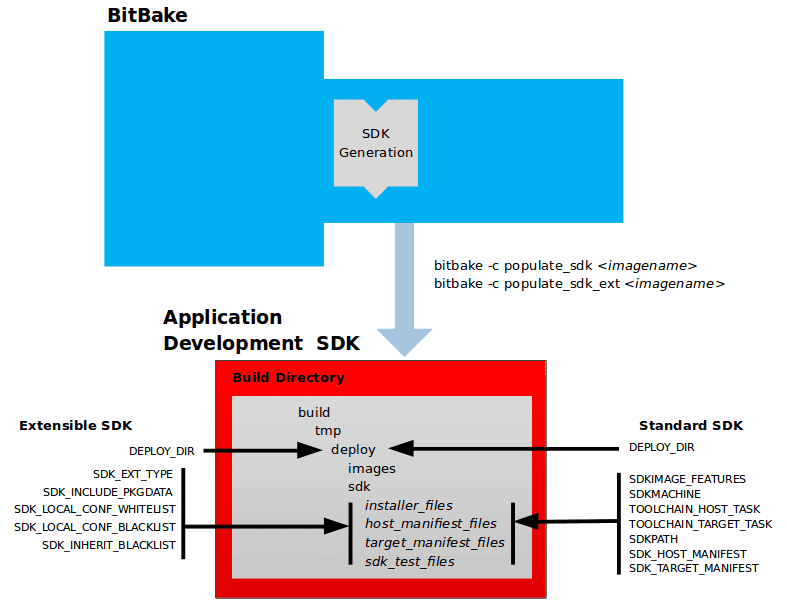
SDK Output Overview
The output of the build system includes files for setting up a cross-development environment using a self-extracting SDK installer. This SDK installer installs various components necessary for cross-development.
Key Components of the SDK Output
-
Self-Extracting SDK Installer (
*.sh):- Function: Installs the SDK.
- Contents:
- Cross-development toolchain (host part).
- Libraries and headers (target part).
- SDK environment setup script.
-
Host and Target Manifest Files:
- Provide details about the installed packages for the host and target parts.
-
SDK Testing Files:
- Used to verify the SDK installation.
SDK Installer Components
- Cross-Development Toolchain: Runs on the SDK machine (host part).
- Libraries and Headers: Built for the target hardware (target part).
- Environment Setup Script: Initializes the environment before using the tools.
Output Directory
- All SDK output files are written to the
deploy/sdkfolder inside the Build Directory.
Variables for SDK Configuration
Extensible SDK (eSDK)
-
DEPLOY_DIR:
- Points to the deploy directory.
-
SDK_EXT_TYPE:
- Controls the inclusion of shared state artifacts in the eSDK.
-
SDK_INCLUDE_PKGDATA:
- Specifies if packagedata for all recipes in the “world” target is included.
-
SDK_INCLUDE_TOOLCHAIN:
- Specifies if the toolchain is included in the eSDK.
-
ESDK_LOCALCONF_ALLOW:
- List of variables allowed from the build system configuration into the eSDK configuration.
-
ESDK_LOCALCONF_REMOVE:
- List of variables not allowed from the build system configuration into the eSDK configuration.
-
ESDK_CLASS_INHERIT_DISABLE:
- List of classes to remove from the INHERIT value globally within the eSDK configuration.
Standard SDK
-
DEPLOY_DIR:
- Points to the deploy directory.
-
SDKMACHINE:
- Specifies the architecture of the machine on which the cross-development tools run.
-
SDKIMAGE_FEATURES:
- Lists the features to include in the “target” part of the SDK.
-
TOOLCHAIN_HOST_TASK:
- Lists packages for the host part of the SDK.
-
TOOLCHAIN_TARGET_TASK:
- Lists packages for the target part of the SDK.
-
SDKPATHINSTALL:
- Defines the default SDK installation path offered by the installation script.
-
SDK_HOST_MANIFEST:
- Lists all installed packages for the host part of the SDK.
-
SDK_TARGET_MANIFEST:
- Lists all installed packages for the target part of the SDK.
Cross-Development Toolchain Generation
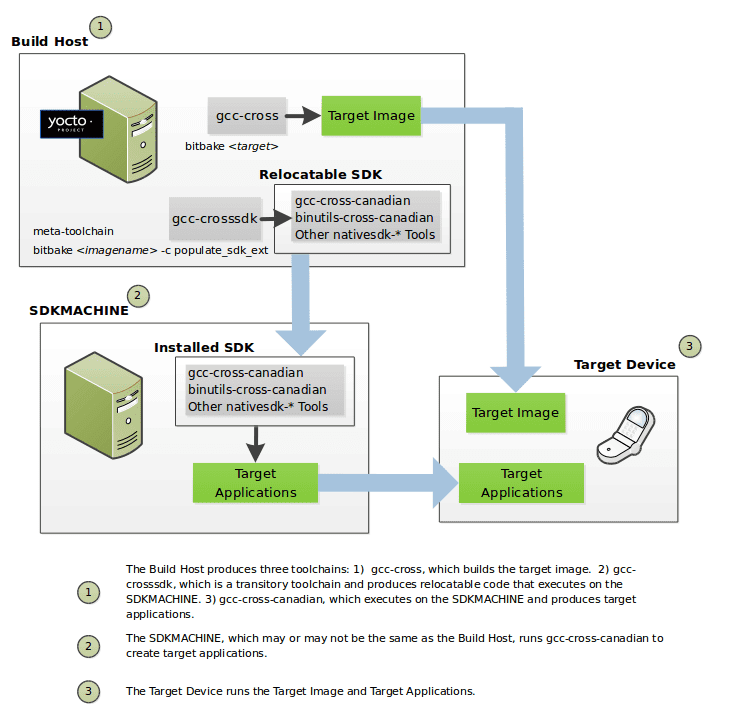
Toolchain Creation Process
The OpenEmbedded build system, running on the Build Host, automates the creation of necessary toolchains with minimal commands. The following outlines the toolchain creation process:
-
Standard Toolchain Bootstrapping:
- binutils-cross: Binary utilities for running the gcc-cross phase and building C library headers.
- linux-libc-headers: Headers for the cross-compiler and C library build.
- gcc-cross: Initial cross-compiler bootstrapped using the host gcc compiler.
- libgcc-initial: Initial gcc support library to bootstrap glibc.
- glibc: The GNU C Library.
- libgcc: Final gcc support library.
- gcc-cross: Final cross-compiler used by BitBake to build target images.
- gcc-runtime: Runtime libraries for the target device.
-
Relocatable Toolchain Bootstrapping:
- gcc: Build host’s GNU Compiler Collection (GCC).
- binutils-crosssdk: Minimum binary utilities for running the gcc-crosssdk-initial phase.
- gcc-crosssdk-initial: Early bootstrap phase for the relocatable cross-compiler.
- linux-libc-headers: Headers for the cross-compiler.
- glibc-initial: Initial version of Embedded GLIBC.
- nativesdk-glibc: Embedded GLIBC for bootstrapping gcc-crosssdk.
- gcc-crosssdk: Transitory compiler aiding in creating gcc-cross-canadian.
- gcc-cross-canadian: Final relocatable cross-compiler producing executable code for the target device.
Using the Toolchains
The cross-development toolchains are built on the Build Host and can be used to develop applications for target hardware. The relocatable SDK installer includes development tools and a sysroot containing gcc-cross.
Commands for Building Toolchains
-
To build an image using BitBake:
bitbake <image-name>
Toolchain Variables
- DEPLOY_DIR: Points to the deploy directory.
- SDKMACHINE: Specifies the architecture for running cross-development tools.
- SDKIMAGE_FEATURES: Lists features for the target part of the SDK.
- TOOLCHAIN_HOST_TASK: Lists packages for the host part of the SDK.
- TOOLCHAIN_TARGET_TASK: Lists packages for the target part of the SDK.
- SDKPATHINSTALL: Defines the default SDK installation path.
- SDK_HOST_MANIFEST: Lists installed packages for the host part of the SDK.
- SDK_TARGET_MANIFEST: Lists installed packages for the target part of the SDK.
Notes
- Extensible SDK: Does not use gcc-cross-canadian as it includes the OpenEmbedded build system and sysroot.
- Pre-built Images: Pre-built images with cross-development toolchain installers are available if your target architecture is supported by the Yocto Project.
Shared State Cache
Shared State Cache in the Yocto Project
The OpenEmbedded build system, used by the Yocto Project, typically builds everything from scratch unless it determines that certain parts do not need to be rebuilt. This ensures a clean build with no stale data, but can be time-consuming. To balance these aspects, the Yocto Project implements a shared state (sstate) cache that supports incremental builds.
Key Questions Addressed by Shared State Code
-
Detecting Changes:
- The build system uses checksums (signatures) to detect changes in task inputs. If a checksum changes, the task is rerun.
-
Managing Changed Components:
- The sstate code tracks which tasks produce which outputs, allowing the build system to remove, upgrade, or manipulate task outputs as needed.
-
Using Pre-built Components:
- The build system can fetch and use pre-built sstate objects from remote locations if they are valid, avoiding unnecessary rebuilds.
Considerations and Techniques
-
PR Information:
- The build system does not maintain PR information in shared state packages. For handling package version incrementing, refer to the “Automatically Incrementing a Package Version Number” section in the Yocto Project Development Tasks Manual.
-
Working with Shared State Code:
- The shared state code is complex. Techniques for managing issues related to shared state include:
- Viewing metadata used to create input signatures of shared state tasks.
- Invalidating shared state to force a task to run.
- These techniques are detailed in the Yocto Project Development Tasks Manual.
- The shared state code is complex. Techniques for managing issues related to shared state include:
Incremental Build Architecture
- Per-Task Basis:
- BitBake, the build engine, determines what parts of the system need to be built on a per-task basis rather than a per-recipe basis.
- Advantage: Switching packaging backends (e.g., from IPK to DEB) does not invalidate all task outputs. Only relevant tasks are rerun, preserving valid outputs.
- Scalability: This approach scales better and allows for easily adding new tasks without modifying the core.
Detailed Workflow
-
Checksum Calculation:
- For each task, BitBake calculates a checksum of the inputs. If the inputs change, the checksum changes, indicating the need to rerun the task.
-
Tracking Outputs:
- The sstate code tracks which tasks produce which outputs. This tracking allows the build system to efficiently manage task outputs.
-
Fetching and Using Sstate Objects:
- The build system can fetch pre-built sstate objects from remote locations. If the fetched sstate objects are valid, they are used, saving time and resources.
-
Managing Package Versions:
- For package version management, particularly with automatic version incrementing, refer to the relevant sections in the Yocto Project manuals.
Example Scenario: Switching Packaging Backends
- Scenario: Switching from IPK to DEB packaging backend.
- Task Validity: The outputs from tasks like
do_installanddo_packageremain valid. - Per-Recipe Approach: Would invalidate the entire build, requiring a full rebuild.
- Per-Task Approach: Only tasks directly affected by the change are rerun, preserving valid task outputs and saving build time.
Checksums (Signatures)
Checksums (signatures) are critical in the Yocto Project for determining when tasks need to be rerun, thus supporting incremental builds. By managing direct and indirect inputs and configuring global and task-specific dependencies, the build system ensures efficient and accurate builds. The “OEBasicHash” signature handler further automates the process, making it robust against changes in metadata.
Detecting Changes
-
Checksum Calculation:
- For shell tasks, a “run” script is generated, and its checksum is used to detect changes.
- For Python tasks, the process determines which variables and functions are accessed, creating a checksum based on these dependencies.
-
Excluding Certain Dependencies:
- WORKDIR Exclusion: The build directory should not affect the output, so WORKDIR is excluded from the checksum.
- Simplistic approach: Set WORKDIR to a fixed value for checksum creation.
-
Managing Dependencies:
- Dependencies between shell functions are figured out to prune “run” scripts to the necessary minimum.
- For Python tasks, dependencies are also figured out and managed to create accurate checksums.
-
Ignoring and Adding Dependencies:
-
Ignoring Dependencies:
PACKAGE_ARCHS[vardepsexclude] = "MACHINE" -
Adding Dependencies:
PACKAGE_ARCHS[vardeps] = "MACHINE"
-
Basehash and Task Dependencies
- Basehash: Direct inputs to a task are referred to as the basehash.
- Indirect Inputs: Checksums for a task include the hashes of all tasks it depends on, combining the basehash and dependent task hashes.
Configuration and Policy
-
Global Variable Dependency Excludes:
-
Use
BB_BASEHASH_IGNORE_VARSto exclude certain variables globally:BB_BASEHASH_IGNORE_VARS ?= "TMPDIR FILE PATH PWD BB_TASKHASH BBPATH DL_DIR \ SSTATE_DIR THISDIR FILESEXTRAPATHS FILE_DIRNAME HOME LOGNAME SHELL TERM \ USER FILESPATH STAGING_DIR_HOST STAGING_DIR_TARGET COREBASE PRSERV_HOST \ PRSERV_DUMPDIR PRSERV_DUMPFILE PRSERV_LOCKDOWN PARALLEL_MAKE \ CCACHE_DIR EXTERNAL_TOOLCHAIN CCACHE CCACHE_DISABLE LICENSE_PATH SDKPKGSUFFIX" -
WORKDIR is inherently excluded as it is a path within TMPDIR.
-
-
Signature Generators:
-
Two basic signature generators in OpenEmbedded-Core (OE-Core): “OEBasic” and “OEBasicHash”.
-
Default handler in BitBake is “noop” (dummy handler), with OE-Core using “OEBasicHash”:
BB_SIGNATURE_HANDLER ?= "OEBasicHash" -
“OEBasicHash” adds task hashes to stamp files, ensuring metadata changes cause task reruns automatically.
-
-
Available Hash Information:
BB_BASEHASH:task-taskname: Base hashes for each task in the recipe.BB_BASEHASH_filename:taskname: Base hashes for each dependent task.BB_TASKHASH: Hash of the currently running task.
Example Scenario: Handling Dependencies
Consider a case where BitBake runs in debug mode (-DDD). It provides output when it cannot determine dependencies. In such scenarios:
-
Ignoring Dependencies:
PACKAGE_ARCHS[vardepsexclude] = "MACHINE" -
Adding Dependencies:
PACKAGE_ARCHS[vardeps] = "MACHINE"
Shared State
The shared state (sstate) mechanism in the Yocto Project enhances the build system by supporting incremental builds. This mechanism allows the reuse of pre-built components, significantly reducing build times.
The shared state system captures a snapshot of a given task’s output, enabling the build process to reuse outputs without concerning itself with their origins. Outputs can be freshly built or fetched from a remote location and unpacked.
Key Concepts
-
Types of Output:
- Directories in WORKDIR: Examples include
do_installordo_packageoutputs. - Shared Directory Tree: Examples include outputs merged into the sysroot.
- Directories in WORKDIR: Examples include
-
Simplified Shared State Wrapping:
- Users can easily add shared state wrapping to tasks using the
sstateclass. For example, in thedo_deploytask:
- Users can easily add shared state wrapping to tasks using the
DEPLOYDIR = "${WORKDIR}/deploy-${PN}"
SSTATETASKS += "do_deploy"
do_deploy[sstate-inputdirs] = "${DEPLOYDIR}"
do_deploy[sstate-outputdirs] = "${DEPLOY_DIR_IMAGE}"

python do_deploy_setscene () {
    sstate_setscene(d)
}
addtask do_deploy_setscene
do_deploy[dirs] = "${DEPLOYDIR} ${B}"
do_deploy[stamp-extra-info] = "${MACHINE_ARCH}"
Detailed Explanation
-
Adding
do_deploytoSSTATETASKS:- Adds required sstate-related processing before and after the
do_deploytask.
- Adds required sstate-related processing before and after the
-
sstate-inputdirsandsstate-outputdirs:sstate-inputdirs: Specifies the output directory when run normally, which becomes input for the shared state cache.sstate-outputdirs: Specifies the directory where shared state cache contents are copied.
-
do_deploy_setsceneTask:- Purpose: Accelerates the
do_deploytask using the shared state cache. - Implementation:
python do_deploy_setscene () { sstate_setscene(d) } addtask do_deploy_setscene- Behavior: If the task is accelerated,
sstate_setscene()returnsTrue. Otherwise, the normaldo_deploytask runs.
- Purpose: Accelerates the
-
Directory Creation and Working Directory:
do_deploy[dirs]: Creates specified directories and sets the current working directory.
-
stamp-extra-info:- Adds metadata to the stamp file to make the task specific to a machine’s architecture.
Advanced Usage
-
Handling Identical Input and Output Directories:
- Use
sstate-plaindirswhensstate-inputdirsandsstate-outputdirsare the same:
do_package[sstate-plaindirs] = "${PKGD} ${PKGDEST}" - Use
-
Multiple Directories:
- Example with multiple input and output directories:
do_package[sstate-inputdirs] = "${PKGDESTWORK} ${SHLIBSWORKDIR}" do_package[sstate-outputdirs] = "${PKGDATA_DIR} ${SHLIBSDIR}" -
Lockfiles:
- Ensure safe manipulation of shared state directory structures:
do_package[sstate-lockfile] = "${PACKAGELOCK}"
Shared State Mirrors and Directory Structure
-
SSTATE_DIR and SSTATE_MIRRORS:
- Configuration example for using shared state mirrors:
SSTATE_MIRRORS ?= "\ file://.* https://someserver.tld/share/sstate/PATH;downloadfilename=PATH \ file://.* file:///some/local/dir/sstate/PATH" -
Shared State Directory Structure:
- Organized into subdirectories based on the first two characters of the hash.
-
Validity Detection:
- The filename of the shared state package contains the task checksum, allowing the build process to validate and use it.
Task Acceleration Phase
-
Using
_setsceneTasks:- Before main execution, BitBake uses
_setscenetasks to accelerate any tasks with available shared state packages.
- Before main execution, BitBake uses
-
Real-world Example:
- Building an IPK-based image where only the
do_package_write_ipktasks fetch and extract shared state packages.
- Building an IPK-based image where only the
Automatically Added Runtime Dependencies
The OpenEmbedded build system simplifies the declaration of runtime dependencies between packages by automatically adding common types of dependencies. This eliminates the need to explicitly declare these dependencies using RDEPENDS. There are three main mechanisms:
-
shlibdeps:
- Automatically adds dependencies for shared libraries.
- Registers packages as providing shared libraries and adds version-restricted runtime dependencies.
-
pcdeps:
- Automatically adds dependencies for pkg-config modules.
- Registers packages as providing modules and adds runtime dependencies based on
Requires:lines in*.pcfiles.
-
depchains:
- Automatically adds dependencies for
-devand-dbgpackages. - Ensures that
foo-devdepends onbar-deviffoodepends onbar.
- Automatically adds dependencies for
By leveraging these mechanisms, the Yocto Project automates the management of common runtime dependencies, simplifying the development process and reducing the need for manual dependency declarations.
1. shlibdeps
Description:
- Manages dependencies related to shared libraries.
Process:
-
During
do_packageTask:- All shared libraries installed by the recipe are located.
- Each shared library is registered as being provided by the package that contains it.
- The package is specifically registered as providing the
sonameof the library. - The resulting mapping is saved globally in
PKGDATA_DIRby thedo_packagedatatask.
-
Dependency Resolution:
- All executables and shared libraries installed by the recipe are inspected to determine which shared libraries they link against.
- For each found shared library dependency,
PKGDATA_DIRis queried to identify the providing package. - If a package containing the library is found, a runtime dependency is added.
-
Version Restrictions:
- The automatically added dependency includes a version restriction, ensuring that at least the current version of the package containing the shared library is used.
Note:
- To exclude a library from being registered (e.g., for internal use only), add the library to
PRIVATE_LIBSin the recipe.
2. pcdeps
Description:
- Manages dependencies related to pkg-config modules.
Process:
-
During
do_packageTask:- All pkg-config modules (
*.pcfiles) installed by the recipe are located. - Each module is registered as being provided by the package that contains it.
- The resulting mapping is saved globally in
PKGDATA_DIRby thedo_packagedatatask.
- All pkg-config modules (
-
Dependency Resolution:
- All pkg-config modules are inspected to determine which other modules they depend on (indicated by
Requires:lines). - For each module dependency,
PKGDATA_DIRis queried to identify the providing package. - If a package containing the module is found, a runtime dependency is added.
- All pkg-config modules are inspected to determine which other modules they depend on (indicated by
Note:
- The
pcdepsmechanism most commonly infers dependencies between-devpackages.
3. depchains
Description:
- Manages dependencies for
-devand-dbgpackages.
Process:
- If package
foodepends on packagebar, thenfoo-devandfoo-dbgwill depend onbar-devandbar-dbg, respectively. - Dependencies added by
depchainsare in the form ofRRECOMMENDS.
Note:
- By default,
foo-devalso has anRDEPENDS-style dependency onfoobecause of the default value ofRDEPENDS:${PN}-devset inbitbake.conf. -devand-dbgpackages are always generated by default, even if they are empty. For more information, see theALLOW_EMPTYvariable.
Dependency Management and Task Order
- The
do_packagetask depends on thedo_packagedatatask of each recipe inDEPENDSthrough a[deptask]declaration. - This ensures that the required shared-library or module-to-package mapping information is available when needed, as long as
DEPENDSis correctly set.
Fakeroot and Pseudo
- Certain tasks in the Yocto Project build process, such as
do_install,do_package_write*,do_rootfs, anddo_image_*, benefit from performing operations typically reserved for the root user. These operations include setting UID and GID of installed files to arbitrary values. However, running BitBake as root is cumbersome and insecure. Instead, tasks are run in a “fake” root environment, known as fakeroot, which allows tasks to operate as if they have root privileges without requiring actual root access. - By using Pseudo and the fakeroot environment, the Yocto Project enables tasks to perform root-only operations without requiring actual root privileges. This approach maintains security and simplifies the build process while ensuring that tasks can manipulate file ownership and permissions as needed. When creating custom tasks that interact with fakeroot-handled files, ensure that these tasks also run under fakeroot and set the appropriate dependencies to maintain consistency and functionality.
Implementing Fakeroot with Pseudo
Pseudo is the program used in the OpenEmbedded build system to implement fakeroot. It creates the illusion of running as root by overriding system calls using the environment variable LD_PRELOAD. Pseudo tracks “fake” file ownership and permissions in an SQLite 3 database stored in ${WORKDIR}/pseudo/files.db for individual recipes, providing persistence between tasks and builds.
Key Points:
- Pseudo: Overrides system calls to simulate root privileges.
- Database: Tracks fake file ownership and permissions, ensuring consistency across tasks.
- Persistence: The database file provides persistence between tasks and builds.
Example: Running a Custom Task with Fakeroot
If you create a custom task that manipulates files or directories handled by a fakeroot task, it must also run under fakeroot. Additionally, it should depend on virtual/fakeroot-native:do_populate_sysroot to ensure proper setup.
Example Custom Task:
fakeroot do_mytask () {
    # Your custom task operations that require root privileges
}

do_mytask[depends] += "virtual/fakeroot-native:do_populate_sysroot"
Steps to Use Fakeroot in Custom Tasks
- Define the Task:
- Use the
fakerootkeyword to define the custom task that requires root privileges.
- Use the
- Set Dependencies:
- Add a dependency on
virtual/fakeroot-native:do_populate_sysrootto ensure that the fakeroot environment is correctly set up.
- Add a dependency on
Additional Information
- FAKEROOT Variables*: For detailed configuration and usage, refer to the
FAKEROOT*variables in the BitBake User Manual. - Background Information: For an in-depth explanation, see the “Why Not Fakeroot?” article, which provides historical context and technical details on Fakeroot and Pseudo.
BitBake Tasks Map
- libhello: A recipe that provides a shared library
- sayhello: A recipe that uses libhello library to do its job
- sayhello depends on libhello at compile time as it needs the shared library to do the dynamic linking process.
- It also depends on it at runtime as the shared library loader needs to find the library.
The contents of libhello_0.1.bb are:
SUMMARY = "Hello demo library"
DESCRIPTION = "Hello shared library used in Yocto demo"

# NOTE: Set the License according to the LICENSE file of your project
#       and then add LIC_FILES_CHKSUM accordingly
LICENSE = "CLOSED"

# Assuming the branch is main
# Change <username> accordingly
SRC_URI = "git://github.com/<username>/libhello;branch=main;protocol=https"

S = "${WORKDIR}/git"

do_install(){
   install -d ${D}${includedir}
   install -d ${D}${libdir}

   install hellolib.h ${D}${includedir}
   oe_soinstall ${PN}.so.${PV} ${D}${libdir}
}
The contents of sayhello_0.1.bb are:
SUMMARY = "SayHello demo"
DESCRIPTION = "SayHello project used in Yocto demo"

# NOTE: Set the License according to the LICENSE file of your project
#       and then add LIC_FILES_CHKSUM accordingly
LICENSE = "CLOSED"

# Assuming the branch is main
# Change <username> accordingly
SRC_URI = "git://github.com/<username>/sayhello;branch=main;protocol=https"

DEPENDS += "libhello"
RDEPENDS:${PN} += "libhello"

S = "${WORKDIR}/git"

do_install(){
   install -d ${D}/usr/bin
   install -m 0700 sayhello ${D}/usr/bin
}
After placing the recipes in a custom layer we can run bitbake sayhello to build the recipe.
The following diagram shows the sequences of tasks that BitBake executes to accomplish that.
