Ch 1. Introduction to MLOps
Rise of the Machine Learning Engineer and MLOps
-
Measuring ML Engineering Success:
- Metrics for success:
- Number of ML models in production.
- Impact of ML models on business ROI.
- Operational efficiency of models (cost, uptime, staff needed for maintenance).
- Metrics for success:
-
Tools and Processes in ML Engineering:
- Tools and methodologies to reduce the risk of ML project failure:
- Cloud-native ML platforms:
- AWS SageMaker, Azure ML Studio, GCP AI Platform
- Containerized workflows:
- Docker containers, Kubernetes, container registries
- Serverless technology:
- AWS Lambda, AWS Athena, Google Cloud Functions, Azure Functions
- Specialized hardware for ML:
- GPUs, Google TPU, Apple A14, AWS Inferentia
- Elastic inference
- Big data platforms and tools:
- Databricks, Hadoop/Spark, Snowflake, Amazon EMR, Google BigQuery
- Cloud-native ML platforms:
- Tools and methodologies to reduce the risk of ML project failure:
-
ML and Cloud Computing Synergy:
- ML requires massive compute, extensive data, and specialized hardware.
- Natural synergy between cloud platforms and ML engineering.
- Cloud platforms build specialized platforms to enhance ML operationalization.
- ML engineering is typically conducted in the cloud.
DevOps Overview
-
Definition:
- DevOps is a set of technical and management practices aimed at increasing an organization’s speed in releasing high-quality software.
-
Benefits of DevOps:
- Speed
- Reliability
- Scalability
- Security
-
Best Practices:
-
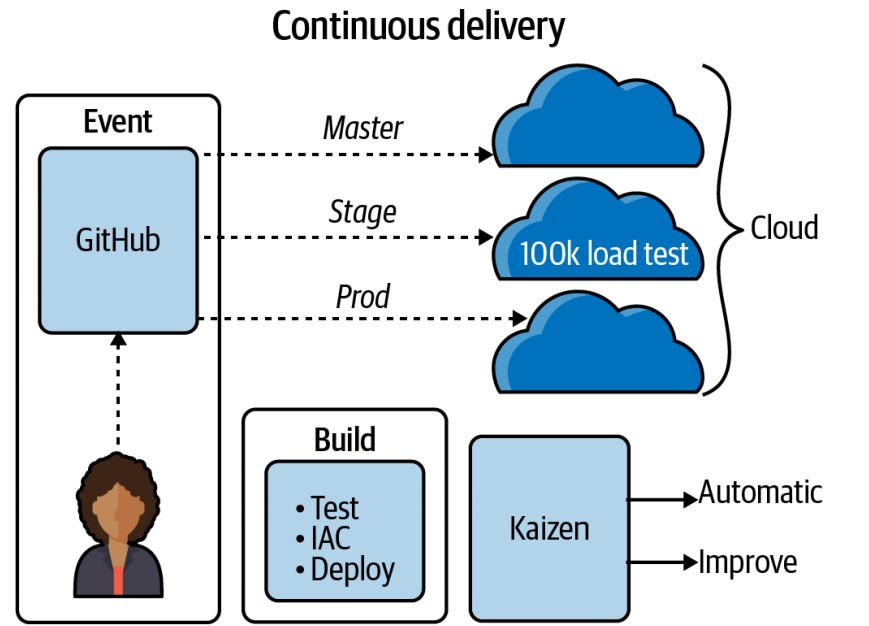
Continuous Integration (CI):
- Continuously tests and improves the quality of software projects.
- Automated testing using open-source and SaaS build servers.
- Popular tools: GitHub Actions, Jenkins, GitLab, CircleCI, AWS CodeBuild.
-
Continuous Delivery (CD):
- Delivers code to a new environment automatically without human intervention.
- Often uses Infrastructure as Code (IaC) for automation.
-
Microservices:
- Software services with distinct functions and minimal dependencies.
- Example: A machine learning prediction endpoint as a microservice.
- Technologies include:
- Flask for Python-based microservices.
- FaaS (Function as a Service): AWS Lambda as a cloud function.
- CaaS (Container as a Service): Deploy Flask applications using Docker with services like AWS Fargate, Google Cloud Run, Azure App Services.
-
Infrastructure as Code (IaC):
- Manages infrastructure using code checked into a source repository.
- Ensures idempotent behavior, eliminating the need for manual infrastructure setup.
- Examples:
- AWS CloudFormation, AWS SAM for cloud-specific IaC.
- Pulumi and Terraform for multicloud options.
-
Monitoring and Instrumentation:
- Techniques for assessing software system performance and reliability.
- Tools: New Relic, DataDog, Stackdriver.
- Focus on collecting data about application behavior in production.
- Encourages a data-driven approach for continuous improvement.
-
Effective Technical Communication:
- Involves creating repeatable and efficient communication methods.
- Example: Using AutoML for initial system prototyping to identify intractable problems early.
-
Effective Technical Project Management:
- Efficiently uses human and technology resources, like ticket systems and spreadsheets.
- Breaks down problems into small, manageable tasks for incremental progress.
- Avoids the antipattern of seeking a perfect solution in one machine learning model, opting for smaller, consistent wins.
-
Continuous Integration and Continuous Delivery
-
Importance:
- Pillars of DevOps, focusing on automation and continuous improvement.
-
Continuous Integration:
- Merges code into a source control repository and automatically checks code quality through testing.
-
Continuous Delivery:
- Automatically tests and deploys code changes to staging or production environments.
MLOps Overview
What is MLOps?
- MLOps (Machine Learning Operations) is a set of practices that aims to deploy and maintain machine learning models in production reliably and efficiently.
- It builds upon the principles of DevOps, applying them to machine learning workflows.
Challenges in Machine Learning
-
Beyond Modeling:
- Machine learning systems face challenges beyond just model creation, including:
- Data engineering and processing
- Assessing problem feasibility and aligning with business goals
- Machine learning systems face challenges beyond just model creation, including:
-
Focus and Culture:
- An overemphasis on technical details can detract from solving real business problems.
- The HiPPO (Highest Paid Person’s Opinions) culture can impede effective decision-making and automation.
- Many ML solutions rely on non-cloud-native datasets and software that do not scale well for large problems.
-
MLOps and DevOps:
- Shared Principles:
- Machine learning systems are a type of software system, sharing DevOps principles like automation and continuous improvement.
- The mantra “if it’s not automated, it’s broken” emphasizes the need for automated processes.
- Unique Components:
- ML systems have unique components, such as machine learning models, requiring tailored approaches to integration and deployment.
- Shared Principles:
Role of Automation in MLOps
-
Automation in ML Workflows:
- Automation is essential in both software engineering and data modeling within MLOps.
- Model training and deployment add complexity to the traditional DevOps lifecycle.
-
Monitoring and Instrumentation:
- Additional monitoring is necessary to address issues like data drift, which refers to changes in data since the last model training.
New Approaches
-
Data Versioning:
- Tracking changes and versions of data to ensure consistency and reproducibility in ML models.
-
AutoML:
- Automating the process of model selection and hyperparameter tuning, aligning with the DevOps mindset for increased efficiency in ML operations.
An MLOps Hierarchy of Needs
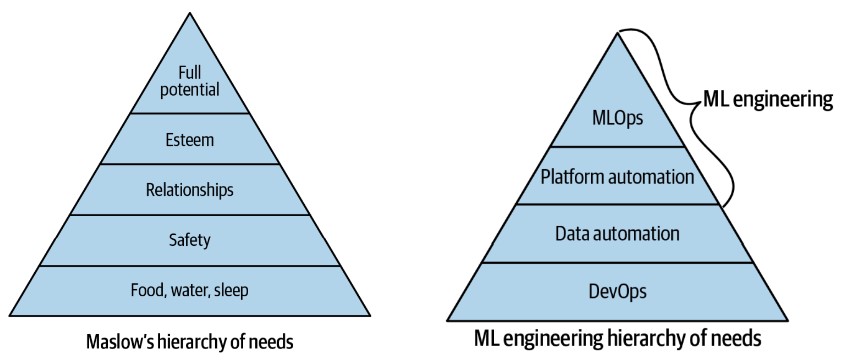
-
Challenges in Machine Learning:
- Achieving the full potential of machine learning in an organization is challenging if foundational DevOps practices and data engineering automation are absent.
-
ML Hierarchy of Needs:
- The ML hierarchy of needs is a conceptual framework to guide the implementation of machine learning systems.
- While not definitive, it is a useful starting point for discussion.
-
Building the ML Hierarchy:
-
Foundation: DevOps Practices
- Establishing DevOps as the foundational layer is crucial for reliable software systems.
- Ensures continuous integration, continuous delivery, infrastructure as code, and other best practices are in place.
-
Data Automation:
- Automating data processes is the next layer.
- Enables efficient data management, preprocessing, and pipeline creation.
-
Platform Automation:
- Involves automating the ML platform, including model deployment and monitoring.
- Reduces manual intervention and improves scalability.
-
ML Automation (MLOps):
- Achieves true ML automation, where models are automatically trained, tested, and deployed.
- Represents the culmination of MLOps, leading to a fully operational machine learning system.
-
Implementing DevOps
Foundation of DevOps: Continuous Integration (CI)
-
Importance of Continuous Integration:
- CI is essential for DevOps, allowing for automated testing and ensuring code quality.
- Modern tools make CI relatively easy to implement for Python projects.
-
Building a Python Project Scaffold:
- Python ML projects typically run on Linux operating systems.
- The following components create a straightforward project structure:
Project Structure and Components
-
Makefile:
-
Purpose:
- A Makefile runs “recipes” via the
makesystem, simplifying CI steps. - Ideal for automating tasks like installing dependencies, linting, and testing.
- A Makefile runs “recipes” via the
-
Note:
- Use a Python virtual environment before working with a Makefile, as it runs commands.
- Configure editors (e.g., Visual Studio Code) to recognize the Python virtual environment for syntax highlighting and linting.
-
Makefile Example:
install: pip install --upgrade pip &&\ pip install -r requirements.txt lint: pylint --disable=R,C hello.py test: python -m pytest -vv --cov=hello test_hello.py -
Commands:
make install: Installs software packages.make lint: Checks for syntax errors.make test: Runs tests using thepytestframework.
-
-
requirements.txt:
- Purpose:
- Used by
pipto install project dependencies. - Supports multiple files for different environments if needed.
- Used by
- Purpose:
-
Source Code and Tests:
-
Source Code (
hello.py):def add(x, y): """This is an add function""" return x + y print(add(1, 1)) -
Test File (
test_hello.py):from hello import add def test_add(): assert 2 == add(1, 1) -
Purpose:
hello.pycontains the main code logic.test_hello.pyusespytestto validate the functionality ofhello.py.
-
-
Creating a Python Virtual Environment:
-
Purpose:
- Isolates third-party packages to a specific directory.
- Prevents conflicts with system-wide Python libraries.
-
Creation:
-
Run the following command to create a virtual environment:
python3 -m venv ~/.your-repo-name
-
-
Activation:
-
Activate the virtual environment with:
source ~/.your-repo-name/bin/activate
-
-
Alternatives:
virtualenvcommand-line tool (included in many Linux distributions) performs a similar function aspython3 -m venv.
-
-
Why Use a Python Virtual Environment?
- Reason:
- Python can access libraries from anywhere on the system, leading to potential conflicts.
- Virtual environments ensure that Python libraries and interpreters are isolated to a specific project.
- Reason:
Local Continuous Integration Steps
-
Install Libraries:
-
Run
make installto install project dependencies. -
Example Output:
$ make install
pip install --upgrade pip &&\
pip install -r requirements.txt
Collecting pip
Using cached pip-20.2.4-py2.py3-none-any.whl (1.5 MB)
[.....more output suppressed here......]
-
-
Lint and Test:
- Use
make lintto check for syntax errors. - Use
make testto run tests and validate code functionality.
- Use
Remote CI Integration
-
Options for SaaS Build Servers:
- GitHub Actions
- Cloud-native build servers:
- AWS CodeBuild
- GCP Cloud Build
- Azure DevOps Pipelines
- Open-source, self-hosted build servers:
- Jenkins
-
Process:
- Once local CI is working, integrate the same process with a remote build server for automated testing and deployment.
Configuring Continuous Integration with GitHub Actions
Setting Up GitHub Actions
-
Creating the Workflow File:
-
You can create a new GitHub Action either by:
- Selecting “Actions” in the GitHub UI and following the prompts to create a new workflow, or
- Manually creating a
.ymlfile inside the.github/workflows/directory of your project.
-
Example file path:
.github/workflows/<yourfilename>.yml
-
-
Sample GitHub Actions Workflow:
- The following is an example workflow for a Python project using GitHub Actions. This workflow performs continuous integration steps, such as installing dependencies, linting, and running tests:
name: Azure Python 3.5

on: [push]

jobs:
  build:
    runs-on: ubuntu-latest

    steps:
      - uses: actions/checkout@v2

      - name: Set up Python 3.5.10
        uses: actions/setup-python@v1
        with:
          python-version: 3.5.10

      - name: Install dependencies
        run: |
          make install

      - name: Lint
        run: |
          make lint

      - name: Test
        run: |
          make test
Explanation of Workflow Steps
-
Trigger Event:
- The workflow is triggered on
pushevents to the GitHub repository.
- The workflow is triggered on
-
Jobs and Steps:
-
Build Job:
- Runs on the latest Ubuntu environment.
-
Steps:
-
Checkout Code:
- Uses the
actions/checkout@v2action to clone the repository.
- Uses the
-
Set Up Python:
- Uses the
actions/setup-python@v1action to specify the Python version (3.5.10 in this example).
- Uses the
-
Install Dependencies:
- Runs the
make installcommand to install project dependencies defined in theMakefile.
- Runs the
-
Linting:
- Runs the
make lintcommand to check for syntax errors usingpylint.
- Runs the
-
Testing:
- Runs the
make testcommand to execute tests usingpytest.
- Runs the
-
-
Completing Continuous Integration
-
Continuous Deployment:
- After setting up continuous integration, the next logical step is continuous deployment.
- This involves automatically deploying the machine learning project into production.
-
Continuous Delivery and Infrastructure as Code (IaC):
- Deploy the code to a specific environment using a continuous delivery process.
- Utilize Infrastructure as Code (IaC) tools (e.g., AWS CloudFormation, Terraform) to manage deployment infrastructure.
DataOps and Data Engineering
Evolving DataOps Tools
-
Apache Airflow:
- Originally designed by Airbnb and later open-sourced.
- Used for scheduling and monitoring data processing jobs.
-
AWS Tools:
- AWS Data Pipeline:
- A service to automate data movement and transformation.
- AWS Glue:
- A serverless ETL (Extract, Load, Transform) tool.
- Automatically detects a data source’s schema and stores metadata.
- AWS Athena and AWS QuickSight:
- Tools for querying and visualizing data.
- AWS Data Pipeline:
Key Considerations for Data Automation
-
Data Size and Frequency:
- Consider the volume of data and how often it changes.
- Cleanliness and consistency of the data are crucial.
-
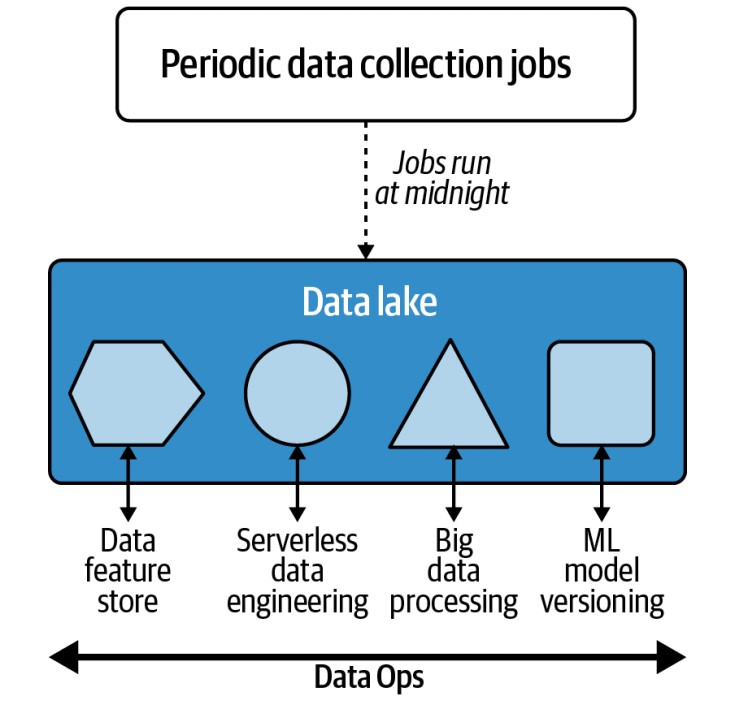
Centralized Data Lake:
- Many organizations use a centralized data lake as the hub for data engineering activities.
- Provides “near infinite” scale in terms of I/O, high durability, and availability.
- Allows data processing “in place” without the need for data movement.
- Often synonymous with cloud-based object storage systems like Amazon S3.
Cloud-Based Data Lakes
-
Advantages:
- Enable processing of large datasets without complex data movement.
- Facilitate various tasks in the same location due to their capacity and computing characteristics.
-
Real-World Application:
- Previously, immense data in the film industry (e.g., movies like Avatar) required complex systems for data movement.
- The cloud eliminates these complexities by providing scalable solutions.
Dedicated Roles and Use Cases
- Data Engineers:
- Focus on building systems to handle diverse data engineering use cases, such as:
- Periodic data collection and job scheduling.
- Processing streaming data.
- Implementing serverless and event-driven data processes.
- Managing big data jobs.
- Data and model versioning for ML engineering tasks.
- Focus on building systems to handle diverse data engineering use cases, such as:
Platform Automation
Integrating Machine Learning with Cloud Platforms
-
Cloud Platform Integration:
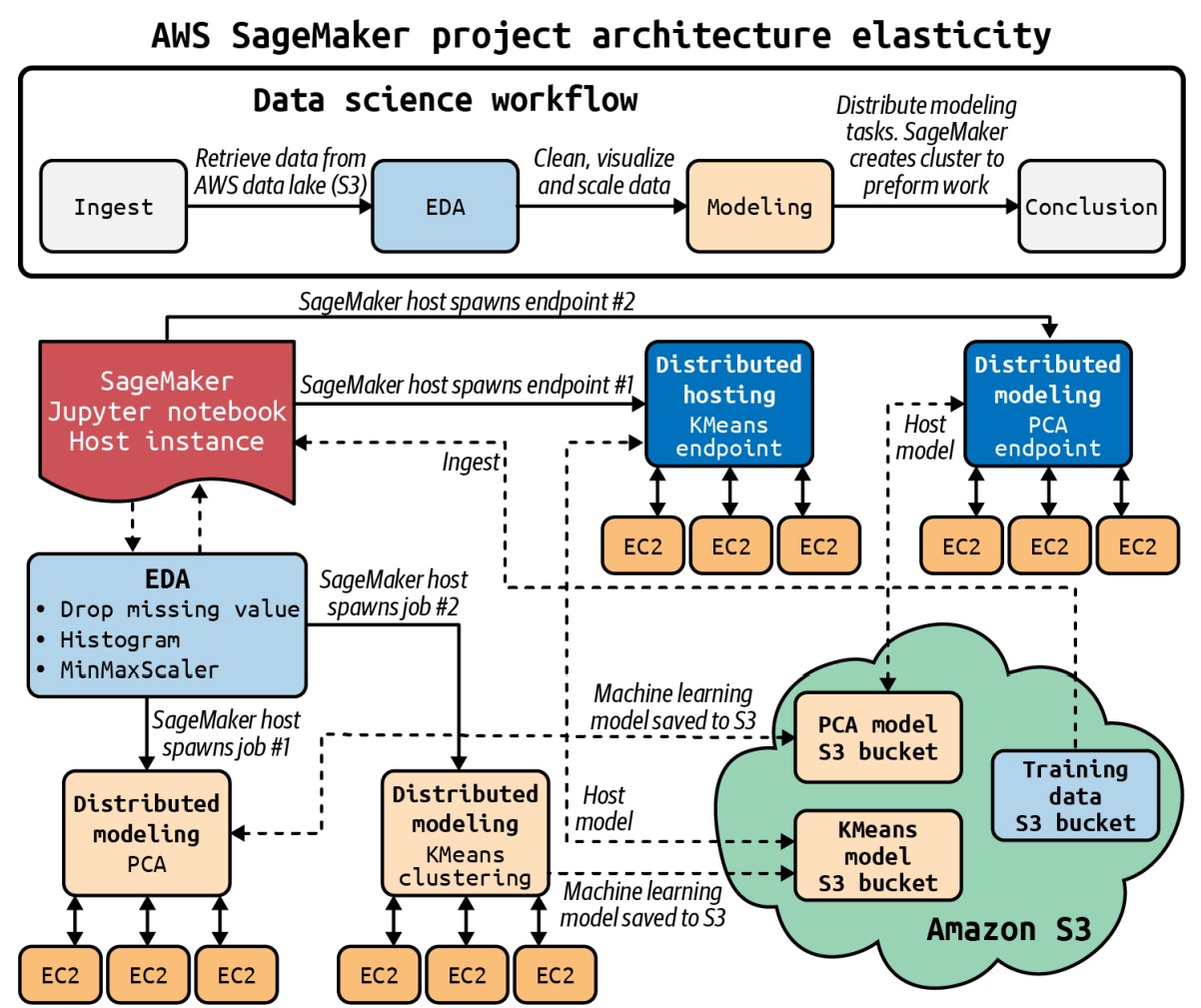
- If an organization collects data in a cloud platform’s data lake, it can naturally integrate machine learning workflows using the same platform:
- Amazon Web Services (AWS): Use Amazon S3 for data storage and Amazon SageMaker for building, training, and deploying machine learning models.
- Google Cloud Platform (GCP): Use Google AI Platform for ML workflows if using Google’s ecosystem.
- Microsoft Azure: Leverage Azure Machine Learning Studio for organizations utilizing Azure services.
- If an organization collects data in a cloud platform’s data lake, it can naturally integrate machine learning workflows using the same platform:
-
Kubernetes and Kubeflow:
- For organizations using Kubernetes, Kubeflow is an ideal platform for managing ML workflows.
- It provides a way to run scalable machine learning models on Kubernetes infrastructure.
Benefits of Platform Automation
- Example: AWS SageMaker:
- AWS SageMaker orchestrates a comprehensive MLOps sequence for real-world machine learning problems.
- Capabilities include:
- Spinning up virtual machines.
- Reading from and writing to S3.
- Provisioning production endpoints.
- Automation of these infrastructure steps is crucial for maintaining efficiency and reliability in production environments.
MLOps
Understanding MLOps
-
Definition:
- MLOps is the application of DevOps principles to machine learning workflows.
- It is a behavior, similar to DevOps, rather than a specific job title.
-
Roles:
- While some professionals work exclusively as DevOps engineers, most software engineers apply DevOps best practices in their roles.
- Similarly, machine learning engineers should employ MLOps best practices when building machine learning systems.
Integration of DevOps and MLOps Best Practices
- Extending DevOps for ML:
- MLOps builds on DevOps practices and extends them to specifically address machine learning systems.
- Key objectives include creating reproducible models, robust model packaging, validation, and deployment.
- Additionally, MLOps focuses on enhancing the ability to explain and observe model performance.
MLOps Feedback Loop
-
Create and Retrain Models with Reusable ML Pipelines:
- Creating a model once is insufficient due to changes in data, customers, and personnel.
- Reusable ML pipelines should be versioned to accommodate these changes and ensure consistency.
-
Continuous Delivery of ML Models:
- Continuous delivery for ML models parallels software continuous delivery.
- Automating all steps, including infrastructure with Infrastructure as Code (IaC), allows models to be deployable to any environment, including production, at any time.
-
Audit Trail for MLOps Pipeline:
- Auditing is crucial for machine learning models to address issues such as security, bias, and accuracy.
- A comprehensive audit trail is invaluable, similar to the importance of logging in software engineering.
- The audit trail contributes to the feedback loop, enabling continuous improvement of both the approach and the problem itself.
-
Observe Model Data Drift to Improve Future Models:
- Data drift refers to changes in data that can affect model performance over time.
- Monitoring data drift, or the changes from the last model training, helps prevent accuracy issues before they impact production.