Video transcoding
- chapter 14 of System Design Interview – An insider’s guide
When you record a video, the device (usually a phone or camera) gives the video file a certain format.
- If you want the video to be played smoothly on other devices, the video must be encoded into compatible bitrates and formats.
- Bitrate is the rate at which bits are processed over time. A higher bitrate generally means higher video quality.
- High bitrate streams need more processing power and fast internet speed.
Video transcoding is important for the following reasons:
- Raw video consumes large amounts of storage space. An hour-long high definition video recorded at 60 frames per second can take up a few hundred GB of space.
- Many devices and browsers only support certain types of video formats.
:brain: To ensure users watch high-quality videos while maintaining smooth playback, it is a good idea to deliver higher resolution video to users who have high network bandwidth and lower resolution video to users who have low bandwidth.
- Network conditions can change, especially on mobile devices.
- To ensure a video is played continuously, switching video quality automatically or manually based on network conditions is essential for smooth user experience.
Many types of encoding formats are available; however, most of them contain two parts:
Container:
- This is like a basket that contains the video file, audio, and metadata.
- You can tell the container format by the file extension, such as .avi, .mov, or .mp4.
Codecs:
- These are compression and decompression algorithms aim to reduce the video size while preserving the video quality.
- The most used video codecs are H.264, VP9, and HEVC.
Directed acyclic graph (DAG) model (for job scheduling)
Transcoding a video is computationally expensive and time-consuming. Besides, different content creators may have different video processing requirements.
- For instance, some content creators require watermarks on top of their videos, some provide thumbnail images themselves, and some upload high definition videos, whereas others do not.
To support different video processing pipelines and maintain high parallelism, it is important to add some level of abstraction and let client programmers define what tasks to execute.
- For example, Facebook’s streaming video engine uses a directed acyclic graph (DAG) programming model, which defines tasks in stages so they can be executed sequentially or parallelly.

The original video is split into video, audio, and metadata. Here are some of the tasks that can be applied on a video file:
- Inspection: Make sure videos have good quality and are not malformed.
- Video encodings: Videos are converted to support different resolutions, codec, bitrates etc.
- Thumbnail. Thumbnails can either be uploaded by a user or automatically generated by the system.
- Watermark: An image overlay on top of your video contains identifying information about your video.
- …
(Potential) Video transcoding architecture
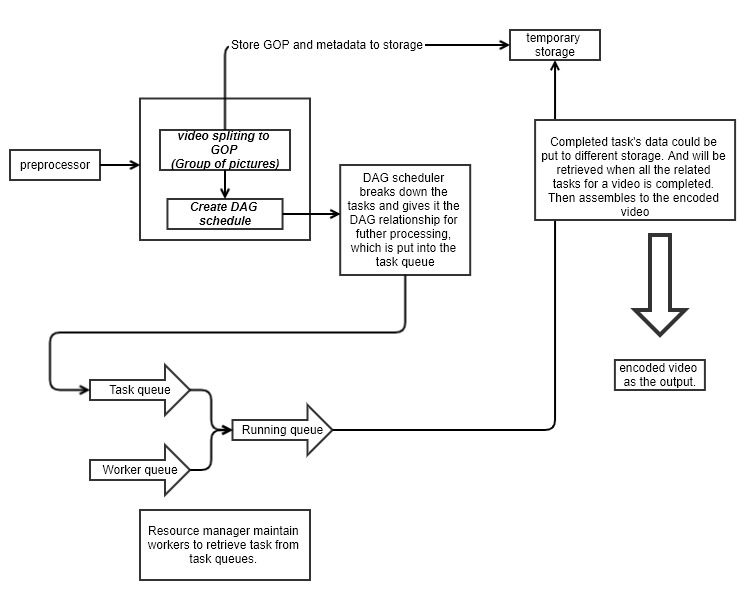
Preprocessor
The preprocessor has 4 responsibilities:
-
Video splitting. Video stream is split or further split into smaller Group of Pictures (GOP) alignment.
- GOP is a group/chunk of frames arranged in a specific order. Each chunk is an independently playable unit, usually a few seconds in length.
-
Some old mobile devices or browsers might not support video splitting. Preprocessor split videos by GOP alignment for old clients.
-
DAG generation. The processor generates DAG based on configuration files client programmers write.
-
Cache data. The preprocessor is a cache for segmented videos. For better reliability, the preprocessor stores GOPs and metadata in temporary storage. If video encoding fails, the system could use persisted data for retry operations.
DAG scheduler
The DAG scheduler splits a DAG graph into stages of tasks and puts them in the task queue in the resource manager.
The original video is split into three stages: Stage 1: video, audio, and metadata. The video file is further split into two tasks in stage 2: video encoding and thumbnail. The audio file requires audio encoding as part of the stage 2 tasks.
Resource manager
The resource manager is responsible for managing the efficiency of resource allocation. It contains 3 queues and a task scheduler as shown in Figure 14-17.
- Task queue: It is a priority queue that contains tasks to be executed.
- Worker queue: It is a priority queue that contains worker utilization info.
- Running queue: It contains info about the currently running tasks and workers running the tasks.
- Task scheduler: It picks the optimal task/worker, and instructs the chosen task worker to execute the job.
The resource manager works as follows:
- The task scheduler gets the highest priority task from the task queue.
- The task scheduler gets the optimal task worker to run the task from the worker queue.
- The task scheduler instructs the chosen task worker to run the task.
- The task scheduler binds the task/worker info and puts it in the running queue.
- The task scheduler removes the job from the running queue once the job is done.
Task workers
Task workers run the tasks which are defined in the DAG. Different task workers may run different tasks
Temporary storage
Multiple storage systems are used here. The choice of storage system depends on factors like data type, data size, access frequency, data life span, etc.
- For instance, metadata is frequently accessed by workers, and the data size is usually small. Thus, caching metadata in memory is a good idea.
- For video or audio data, we put them in blob storage.
- Data in temporary storage is freed up once the corresponding video processing is complete.
Encoded video
Encoded video is the final output of the encoding pipeline.