Ch 1. Welcome to Docker
This chapter on Docker offers a clear overview of its purpose, applications, and impact. Here’s a streamlined and structured recap:
Chapter 1: Welcome to Docker
Why Docker?
- For Linux Software Enthusiasts:
- Docker offers a safe and simple way to explore new software while minimizing security risks.
- For System Administrators:
- Simplifies software management, saving time for high-value tasks.
- For Software Developers:
- Ensures consistency in development environments and simplifies software distribution.
- For Large-Scale System Managers:
- Streamlines build, test, and deployment pipelines with uniform processes.
What is Docker?
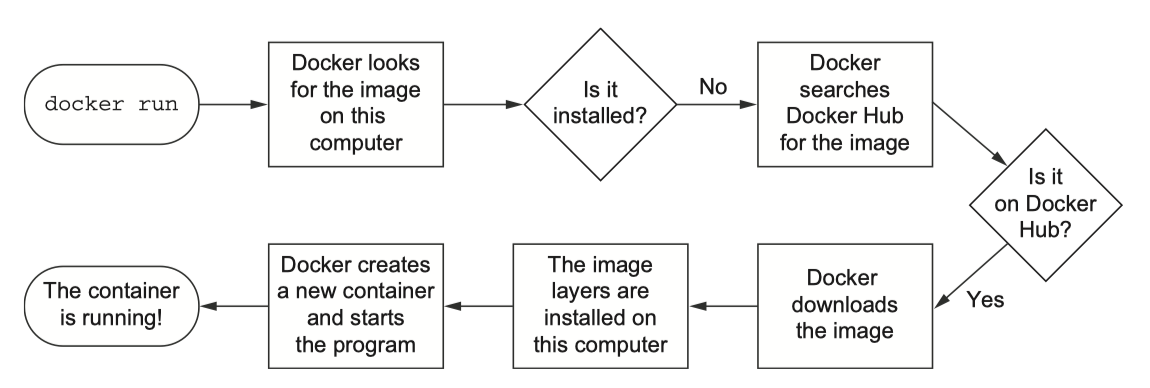
Docker is a command-line program, a background daemon, and a set of remote services that simplifies software management. It uses containers for efficient and secure isolation of software processes.
1.1.1 Containers
- Definition:
- Containers isolate processes, ensuring access only to explicitly permitted resources.
- Challenges:
- Building and managing containers manually is complex and error-prone.
- Docker’s Role:
- Automates container creation with best practices, saving time, costs, and improving security.
1.1.2 Containers vs. Virtual Machines
- Virtual Machines:
- Simulate hardware, require a full OS, and consume significant resources.
- Docker Containers:
- Use the host Linux kernel, avoiding unnecessary overhead.
- Lightweight and faster than virtual machines.
Key Difference: Docker is not virtualization—it utilizes the OS’s built-in container technology.
1.1.3 Running Software in Containers
- How Docker Works:
- Uses Linux Namespaces and cgroups for isolation.
- Architecture:
- Docker Daemon: Manages containers.
- Docker CLI: User-facing tool for container management.
- Container Isolation: Ensures security through PID, UTS, MNT, NET namespaces, and other mechanisms.
1.1.4 Shipping Containers
- Docker Containers:
- Portable units encapsulating applications and their dependencies.
- Docker Images:
- Snapshots used to create containers, distributed via registries like Docker Hub.
1.2 What Problems Does Docker Solve?
1. Simplifies Software Installation
- Containers bundle software with all dependencies, eliminating installation inconsistencies.
2. Resolves Application Conflicts
- Prevents interference between applications by isolating them in containers.
3. Enhances Security
- Encapsulates software to limit risks and simplify updates.
Getting Organized with Docker
- Without Docker:
- Applications and dependencies are scattered, creating a tangled web of interactions.
- With Docker:
- Containers keep applications isolated and self-contained, simplifying management.
1.2.2 Improving Portability
- Docker allows applications to run consistently across different platforms by standardizing on Linux.
- Benefits:
- Unlocks previously inaccessible software.
- Reduces learning curves and surprises for developers.
- Simplifies software development by focusing on a single platform.
1.2.3 Protecting Your Computer
- Containers act as “jail cells,” isolating programs and limiting the scope of potential security threats.
- Benefits:
- Mitigates risks from malicious or buggy software.
- Strengthens security through container-based isolation.
1.3 Why is Docker Important?
1. Simplification
- Standardizes software installation and removal, leaving no lingering artifacts.
2. Industry Support
- Backed by major players like Amazon, Microsoft, and Google.
3. Cross-Platform Solution
- Works seamlessly across systems, similar to app stores for mobile devices.
4. Accessibility of Isolation Features
- Makes advanced OS-level isolation practical and accessible.
1.4 Where and When to Use Docker
Where Docker Excels
- Linux-compatible applications, server software, desktop tools, and day-to-day tasks.
- Keeps systems clean and simplifies maintenance for businesses.
When Docker is Not Ideal
- Applications requiring full machine access or administrative privileges.
- Untrusted software, especially in shared environments.
This recap summarizes Docker’s capabilities, benefits, and limitations, making it an essential tool for modern software development and system management.This chapter on Docker offers a clear overview of its purpose, applications, and impact. Here’s a streamlined and structured recap:
Chapter 1: Welcome to Docker
Why Docker?
- For Linux Software Enthusiasts:
- Docker offers a safe and simple way to explore new software while minimizing security risks.
- For System Administrators:
- Simplifies software management, saving time for high-value tasks.
- For Software Developers:
- Ensures consistency in development environments and simplifies software distribution.
- For Large-Scale System Managers:
- Streamlines build, test, and deployment pipelines with uniform processes.
What is Docker?
Docker is a command-line program, a background daemon, and a set of remote services that simplifies software management. It uses containers for efficient and secure isolation of software processes.
1.1.1 Containers
- Definition:
- Containers isolate processes, ensuring access only to explicitly permitted resources.
- Challenges:
- Building and managing containers manually is complex and error-prone.
- Docker’s Role:
- Automates container creation with best practices, saving time, costs, and improving security.
1.1.2 Containers vs. Virtual Machines
- Virtual Machines:
- Simulate hardware, require a full OS, and consume significant resources.
- Docker Containers:
- Use the host Linux kernel, avoiding unnecessary overhead.
- Lightweight and faster than virtual machines.
Key Difference: Docker is not virtualization—it utilizes the OS’s built-in container technology.
1.1.3 Running Software in Containers
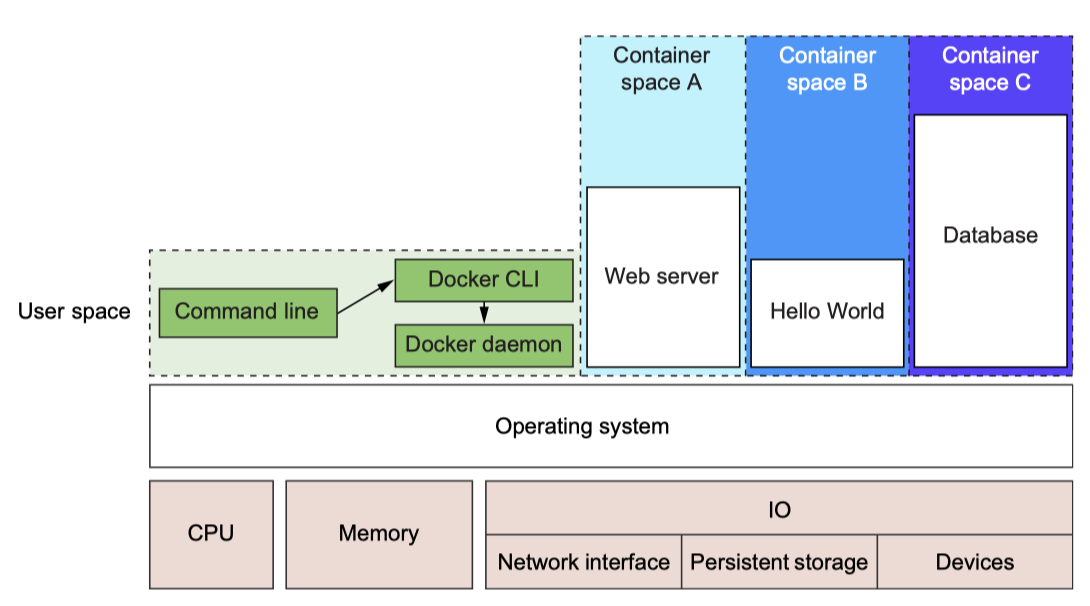
- How Docker Works:
- Uses Linux Namespaces and cgroups for isolation.
- Architecture:
- Docker Daemon: Manages containers.
- Docker CLI: User-facing tool for container management.
- Container Isolation: Ensures security through PID, UTS, MNT, NET namespaces, and other mechanisms.
1.1.4 Shipping Containers
- Docker Containers:
- Portable units encapsulating applications and their dependencies.
- Docker Images:
- Snapshots used to create containers, distributed via registries like Docker Hub.
1.2 What Problems Does Docker Solve?
1. Simplifies Software Installation
- Containers bundle software with all dependencies, eliminating installation inconsistencies.
2. Resolves Application Conflicts
- Prevents interference between applications by isolating them in containers.
3. Enhances Security
- Encapsulates software to limit risks and simplify updates.
Getting Organized with Docker
- Without Docker:
- Applications and dependencies are scattered, creating a tangled web of interactions.
- With Docker:
- Containers keep applications isolated and self-contained, simplifying management.
1.2.2 Improving Portability
- Docker allows applications to run consistently across different platforms by standardizing on Linux.
- Benefits:
- Unlocks previously inaccessible software.
- Reduces learning curves and surprises for developers.
- Simplifies software development by focusing on a single platform.
1.2.3 Protecting Your Computer
- Containers act as “jail cells,” isolating programs and limiting the scope of potential security threats.
- Benefits:
- Mitigates risks from malicious or buggy software.
- Strengthens security through container-based isolation.
1.3 Why is Docker Important?
1. Simplification
- Standardizes software installation and removal, leaving no lingering artifacts.
2. Industry Support
- Backed by major players like Amazon, Microsoft, and Google.
3. Cross-Platform Solution
- Works seamlessly across systems, similar to app stores for mobile devices.
4. Accessibility of Isolation Features
- Makes advanced OS-level isolation practical and accessible.
1.4 Where and When to Use Docker
Where Docker Excels
- Linux-compatible applications, server software, desktop tools, and day-to-day tasks.
- Keeps systems clean and simplifies maintenance for businesses.
When Docker is Not Ideal
- Applications requiring full machine access or administrative privileges.
- Untrusted software, especially in shared environments.