Virtualization
Notes highlighted from sources:
Virtualization usually refers to running software on a computer to create a virtual machine (VM), an environment that imitates a physical machine.
- You can install and run an operating system in this environment as if it were its own physical computer.
- In a networking sense, a single physical machine could house multiple virtual machines, each running a different networking task, such as DHCP, DNS, firewall, VPN, and so on.
- No matter what a server is serving, traditionally we have a substantial amount of hardware underutilization. So how do we fix hardware underutilization? Well, we need the servers to do more with the hardware they have.
- Luckily for us, PC processors, using roughly the same set of functions that enables your CPU to multitask many applications at once, can instead multitask a bunch of virtual machines. Virtualization enables one machine— called the — to run multiple operating systems simultaneously. This is called hardware virtualization.
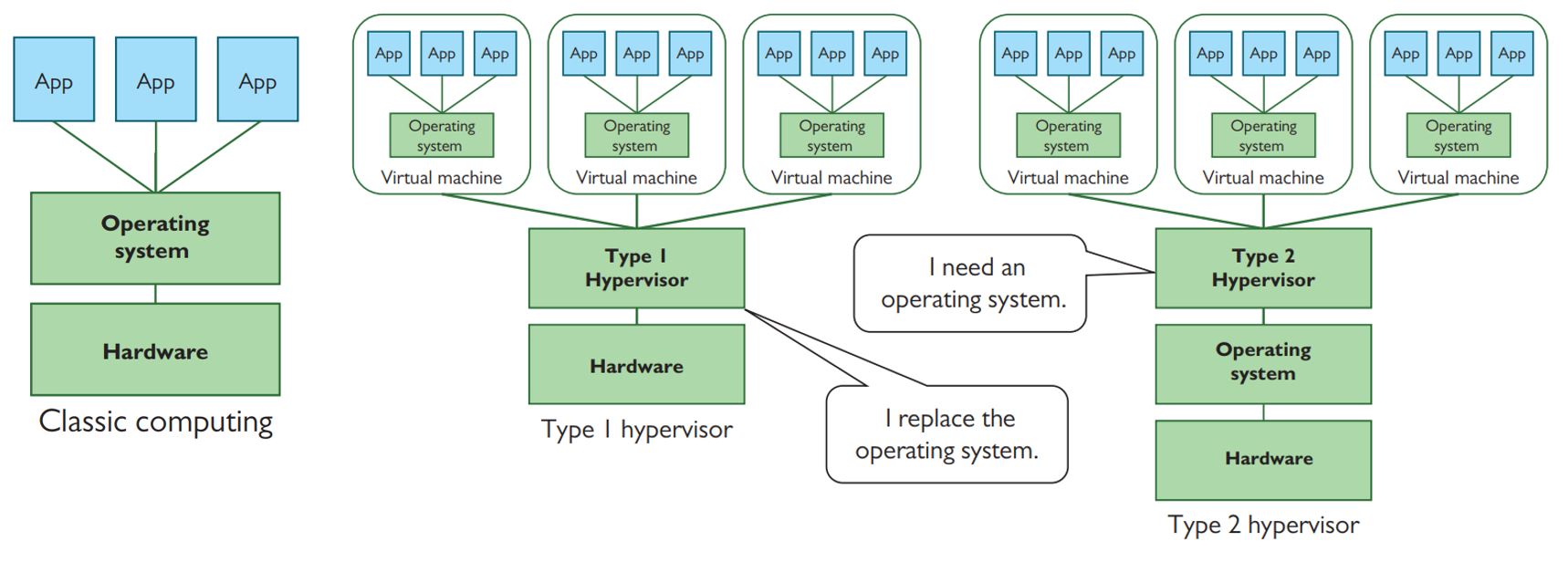
- A virtual machine is a special program, running in protected space (just like programs run in protected space), that enables all the features of the server (RAM, CPU, drive space, peripherals) to run as though they are each separate computers (ergo, virtual machines). - The program used to create, run, and maintain the VMs is called a hypervisor.
- You can install and run an operating system in this guest virtual environment as if it were its own physical computer. The VM is stored as a set of files that the hypervisor can load and save with changes.
- There are two types of hypervisors (Figure 15-4). A Type 1 hypervisor is installed on the system in lieu of an operating system. A Type 2 hypervisor is installed on top of the operating system.
- Nearly every Web site is installed in a virtual machine running on a server. The chances of you ever hitting a Web site that uses classical Web hosting are almost nil.
Abstraction
- Modern networks separate form from function on many levels, actions that are defined by the jargon word abstraction.
- It’s a loaded term that has meanings in both English and networking.
- To abstract means to remove or separate. In networking terms, it means to take one aspect of a device or process and separate it from that device or process.
- For example, hardware virtualization: with an operating system separated from hardware, being placed in a virtual machine. This is abstraction at work. The OS is abstracted (removed a step) from the bare metal, the computing hardware.
- This same concept applies to more than VMs; it applies to how networks work in general. The whole idea of networking is to get data from one computer to another, right? Ethernet provides one form of connectivity. But the data coming from the sender originates much higher up the OSI protocol stack, eventually getting packaged into an IP packet. IP doesn’t know Ethernet. IP is one step removed from the Ethernet frame that gets put on the wire.
Here’s the key: applications can work with the Internet Protocol as a stand-alone thing, regardless of whether the network uses Ethernet or some other physical protocol to get data from source to destination.
The Internet Protocol is an abstraction that spares most applications from needing to know or care how their messages get from one place to another—and Ethernet is also an abstraction that spares IP from needing to know how to send those messages out on the wire.
Abstraction—and particularly the process of abstracting something complicated into layers that let us focus on a few issues at a time—plays an important role in how network people manage complexity.
Abstraction is therefore both a concept and a noun, defining the process of separating functions into discrete units; those discrete units are abstractions.
Virtualization describes a specific kind of abstraction: a pattern that involves creating a virtual (software) version of something.
- Once upon a time, we created virtual (sometimes called logical) versions of real, physical things.
- But virtualization proved to be such a fruitful idea that we’ve kept right on virtualizing things that are already virtual.
- To keep your bearings, remember that most kinds of virtualization replace an existing component with a layer of software that is roughly indistinguishable to any programs, devices, or users that interact with it
Cloud Computing
- Cloud computing moves the specialized machines used in classic and virtualized networking “out there somewhere,” using the Internet to connect an organization to other organizations to manage aspects of the network.
The Service-Layer Cake
- Service is the key to understanding the cloud.
- At the hardware level, we’d have trouble telling the difference between the cloud and the servers and networks that comprise the Internet as a whole.
- We use the servers and networks of the cloud through layers of software that add great value to the underlying hardware by making it simple to perform complex tasks or manage powerful hardware.
- End users mostly interact with the service-layer cake’s sweet software icing—Web applications like Dropbox, Gmail, and Netflix.
- The rest of the cake, however, is thick with cool services that programmers, techs, and admins can use to build and support their applications and networks.
It’s common to categorize cloud services into one of three service models that broadly describe the type of service provided to whoever pays the bill.
- I’ll relate each of these service models to popular providers, but you should know that service models aren’t a perfect way to characterize cloud service providers (because most of them offer many services that fit into different categories in the model).
- Service models are, however, a good shorthand to differentiate between services that meet the same general need in very different ways. Let’s slice the cake open to take a closer look at these three service models
--------------------------------
Software as a service
--------------------------------
Platform as a service
--------------------------------
Infrastructure as a service
--------------------------------
:cake: Infrastructure as a Service
- Large-scale global infrastructure as a service (IaaS) providers like Amazon Web Services (AWS) enable you to set up and tear down infrastructure—building blocks—on demand. Generally, IaaS providers just charge for what you use.
- For example, you can launch a few virtual servers to host an internal application like a support ticket database, create a private network for communication between the servers, and support VPN connections from a few branch offices to the user-facing application server. Or you can relocate a file server that has run out of drive bays to have effectively unlimited data storage billed by how much you store, how long you store it, and how often it gets transferred or downloaded.
- The beauty of IaaS is that you no longer need to purchase and administer expensive, heavy hardware. You pay to use the provider’s powerful infrastructure as a service while you need it and stop paying when you release the resources.
- IaaS doesn’t spare you from needing to know what you’re doing, though! You’ll still have to understand your organization’s needs, what components can meet them, and how to configure or integrate them to meet the goal.
:cake: Platform as a Service
- A platform as a service (PaaS) provider gives you some form of infrastructure, which could be provided by an IaaS, but on top of that infrastructure the PaaS provider builds a platform: a complete deployment and management system to handle every aspect of meeting some goal.
- For most PaaS providers in this middle cake layer, the customer’s goal is running a Web application.
- The important point of PaaS is that the infrastructure underneath a PaaS is largely invisible to the customer. The customer cannot control it directly and doesn’t need to think about its complexity.
- Heroku, an early PaaS provider, creates a simple interface on top of the IaaS offerings of AWS, further reducing the complexity of developing and scaling Web applications.
:cake: Software as a Service
- Software as a service (SaaS) replaces applications once distributed and licensed via physical media (such as CD-ROMs in retail boxes) with subscriptions to equivalent applications from online servers.
- In the purest form, the application runs on the server; users don’t install it—they just access it with a client (often a Web browser).
- The popularity of the subscription model has also led developers of more traditional desktop software to muddy the water. Long the flagship of the retail brick-and-mortar Microsoft product line, the Office suite (Word, PowerPoint, Excel, etc.) migrated to a subscription-based Microsoft 365 service in 2011 (then called Office 365).
- In the old days, if you wanted to add Word to your new laptop, you’d buy a copy and install it (maybe even from a disc). These days, you pay Microsoft every month or year, log in to your Microsoft account, and either download Word to your laptop or just use Word Online. Only the latter is SaaS in the pure sense.
Cloud Deployment Models
-
Organizations have differing needs and capabilities, of course, so there’s no one-size-fitsall cloud deployment model that works for everyone. When it comes to cloud computing, organizations have to balance cost, control, customization, and privacy.
-
Some organizations also have needs that no existing cloud provider can meet. Each organization makes its own decisions about these trade-offs, but the result is usually a cloud deployment that can be categorized in one of four ways:
-
Most folks usually just interact with a public cloud, a term used to describe software, platforms, and infrastructure that the general public sign up to use. When we talk about the cloud, this is what we mean.
-
If a business wants some of the flexibility of the cloud, needs complete ownership of its data, and can afford both, it can build an internal cloud the business owns—a private cloud.
-
A community cloud is more like a private cloud paid for and used by more than one organization with similar goals or needs (such as medical providers who all need to comply with the same patient privacy laws).
-
A hybrid cloud deployment describes some combination of public, private, and community cloud resources. This can, for example, mean not having to maintain a private cloud powerful enough to meet peak demand—an application can grow into a public cloud instead of grind to a halt, a technique called cloud bursting.
Virtualization’s Role in Cloud Computing
Virtualization profoundly impacts cloud computing.
- We’ve already seen a big financial reason for this—it helps the many massive data centers that comprise the cloud scale up efficiently. But virtualization’s role is more foundational than dollar signs.
- IaaS providers let their customers “create” as many servers as they need on-demand, “destroy” those same servers as soon as they are done, and only bill them for the time and resources they used.
- The reason this arrangement works is because the providers can set up everything the customer selects in real time—and then release the resources for another customer just as quickly.
- Human techs would have trouble reconfiguring networks and systems with the speed and confidence it takes to make this work for one customer, let alone keep it humming along smoothly for hundreds of thousands or even millions of them.
- The software-based flexibility of these virtualized components enables a cloud provider to integrate all of them with its own management systems, which orchestrate a dizzying swarm of automated tasks into the globe-spanning machines we call a cloud.
Infrastructure as Code
- Organizations that develop networked applications and services have developed a philosophy over the years to address problems with scaling. Infrastructure as code (IaC), in a nutshell, abstracts the infrastructure of an application or service into a set of configuration files or scripts.
- Let’s break this process down into three parts so we can unpack yet another important concept.
- First, we’ll look at the hurdles faced by the organizations.
- Second, we’ll explore automation options.
- We’ll finish with a concept called orchestration that helps organizations apply software-driven flexibility to problems.
Scaling Problems
- As networked applications and services grow and mature, the organizations that develop them run into their own kinds of scaling problems. A few examples illustrate these problems.
- They have so many programmers that the programmers end up constantly stepping on each other’s toes by making incompatible changes.
- Their applications grow so complex that no one person knows how to set up the components needed to test them.
- Their databases grow too big to fit on the beefiest servers money can buy.
The teams that build these applications initially had to blaze their own trails through this particular wilderness, but the approaches that have worked for them are filtering out to the rest of the industry in the form of tools, paid services, and efforts to spread the word about best practices.
Automation
- When an application managed by a small number of people runs on a single server, manually configuring and tweaking that server can be convenient.
- But if that same application scales up to the point where several teams work on it and it runs on many servers spread around the world, the same convenience becomes a liability.
- Over time, all-too-human mistakes and miscommunication tend to snowball until software that works fine on one server is a source of hard-to-troubleshoot bugs on another.
- The broad solution to this problem is to replace tasks people do manually with automation—using code to set up (provision) and maintain systems (installing software updates, for example) in a consistent manner, with no mistyped commands.
- Multistep tasks that you have to perform frequently are a good place to start, but it can be even more important to automate infrequent tasks that you tend to forget the steps to complete.
- A little automation is better than nothing, but that’s where IaC comes into play. By defining an application’s or service’s infrastructure (the servers and network components) in configuration files or scripts, organizations that apply IaC can more easily create identical copies of the needed infrastructure.
- While this automation helps scale up the application to run on more servers, some of the big benefits of the IaC philosophy turn out to be just as important for small apps and teams:
- The ability to create identical copies of the necessary infrastructure makes it easy for people working on the application to create a development environment or test environment—separate temporary copies of the infrastructure used to develop new features and test out updates.
- You can save the code/scripts for creating and configuring the infrastructure in a source/version control system alongside the rest of the application’s code, making it easier to ensure the infrastructure and application are compatible.
- You can also carefully review changes before rolling them out, helping catch configuration mistakes before they are applied to real, working systems.
Orchestration
Orchestration combines automated processes into bigger, multifaceted processes called pipelines or workflows.
Orchestration streamlines development, testing, deploying, or maintaining, depending on the specific workflow.
- Some of the best-run applications use a specific kind of orchestration called continuous integration/continuous deployment (CI/CD). When developers check in changes to the application’s code, they trigger an automatic multistep pipeline that can build the application, set up a temporary copy of the infrastructure the app needs, and run a bunch of automated checks to ensure it works.
- If these fail, the developers have to go back to square one. But if the new code passes the checks, the pipeline starts the process of deploying the new version.
- Deploying can be as simple as just uploading the new code to each server, but these pipelines tend to incorporate lessons learned the hard way from botched deployments that knocked the service offline or deleted important data. The result can be a methodical sequence that eases into updates by backing up data, spinning up new copies of the infrastructure running the latest code, rotating them into use, and monitoring for signs deployment should stop and roll back the update.
- In either case, this pipeline orchestrates tasks across multiple systems and services to meet the high-level goal of rolling out application updates in a safe, consistent manner.
- Another common kind of orchestration focuses on keeping a running service or application healthy. This usually involves monitoring a service and its components to identify any trouble—maybe a host froze, crashed, or is just responding slowly. When the monitoring system fires off a warning, it can trigger a pipeline that starts up a replacement host and swaps it into service as soon as it is ready.